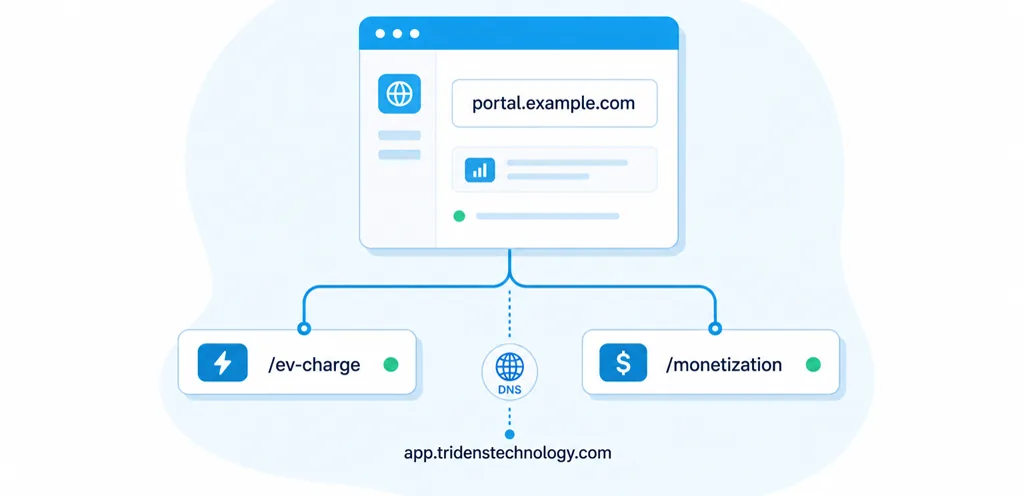


Una guía completa para redirigir el dominio de un portal de clientes con marca propia a Tridens y utilizarlo para los portales Tridens EV Charge y Tridens Monetization.
Esta guía está dirigida a los administradores de clientes y a los equipos de TI que deseen disponer de una URL de portal de marca blanca en lugar de redirigir a los usuarios a un dominio de aplicación genérico. Con un registro CNAME personalizado, tus clientes podrán acceder a sus portales desde una dirección con su propia marca, como por ejemplo https://portal.example.com/ev-charge o https://portal.example.com/monetization.
La configuración del DNS es sencilla, pero los detalles son importantes. El destino del CNAME debe apuntar a app.tridenstechnology.com. No añadas https:// dentro del registro DNS. Se utiliza HTTPS cuando los usuarios abren la URL definitiva del portal en su navegador.
Visión general rápida
Una URL de portal de marca blanca permite a tus clientes utilizar tu propio subdominio para acceder al portal de Tridens. La URL pública sigue perteneciendo a tu marca, mientras que Tridens se encarga de la aplicación que hay detrás.
Por ejemplo, si tu empresa es propietaria de ejemplo.com, puedes crear el subdominio portal.ejemplo.com. Una vez configurado el DNS y activado el dominio del portal, tus clientes podrán acceder a la ruta correcta del portal:
https://portal.example.com/ev-chargepara el portal Tridens EV Charge.https://portal.example.com/monetizationpara el portal Tridens Monetization.
Lo que necesita antes de empezar
Antes de modificar los registros DNS, asegúrate de haber tomado las decisiones adecuadas en cuanto al acceso y la nomenclatura. De este modo, se evitan retrasos en la propagación del DNS, la activación de SSL y las pruebas del portal.
- Un entorno Tridens activo con el portal necesario habilitado.
- Acceso a la configuración del DNS del dominio de tu empresa.
- Un subdominio elegido, como por ejemplo
portal,mi,cuentaoclientes. - Confirmación de que el subdominio seleccionado no está ya en uso por otra página web o aplicación.
- Autorización de tu equipo interno de TI, seguridad o administración de dominios, si el DNS se gestiona de forma centralizada.
Utiliza un subdominio en lugar del dominio raíz. Por ejemplo, utiliza portal.ejemplo.com, no ejemplo.com. De este modo, tu página web principal queda separada del portal Tridens.
Cómo funciona la URL del portal de marca blanca
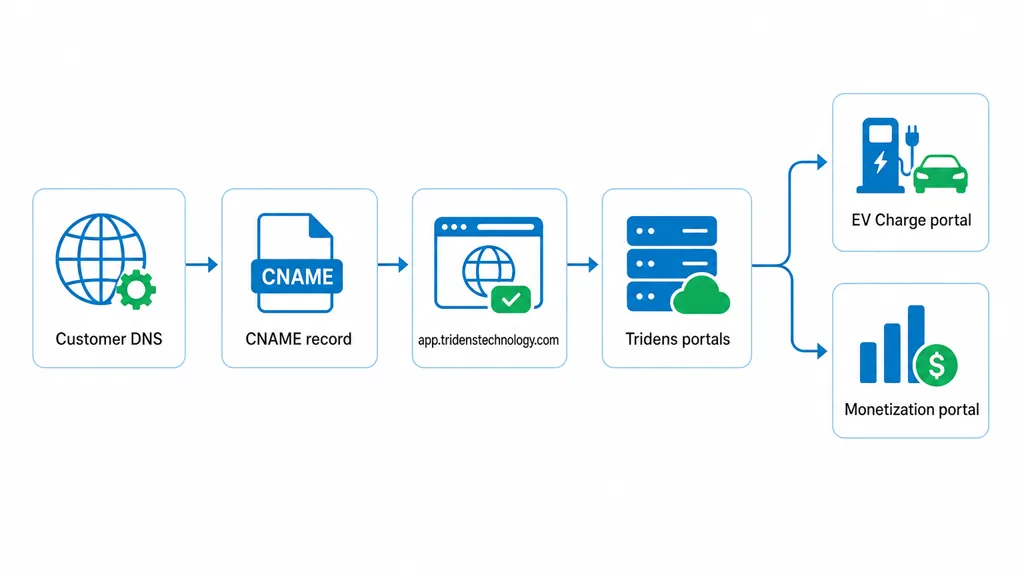
La configuración de marca blanca conecta tu dominio a la aplicación Tridens a través del DNS. Tu cliente introduce tu URL con tu marca, el registro DNS redirige el subdominio a Tridens y Tridens redirige al visitante a la ruta correcta del portal.
Se puede utilizar el mismo subdominio de marca para ambas rutas del portal cuando ambas estén habilitadas en tu cuenta. De este modo, la URL visible para el cliente se mantiene clara y predecible.
| Portal | Ejemplo de URL de marca | Caso de uso |
|---|---|---|
| Tridens EV Charge | https://portal.example.com/ev-charge | Clientes de recarga de vehículos eléctricos, conductores, usuarios de flotas o usuarios del portal. |
| Tridens Monetization | https://portal.example.com/monetization | Usuarios del portal de facturación, suscripciones, cuentas de clientes y gestión de ingresos. |
Si utilizas ambos Tridens EV Charge y Tridens Monetization, comprueba qué rutas del portal deben ser visibles para tus usuarios finales antes de compartir públicamente el enlace con la marca.
Configurar el registro CNAME
Los proveedores de DNS utilizan denominaciones ligeramente diferentes, pero la estructura de los registros suele ser la misma. Debes crear un registro CNAME para el subdominio que hayas elegido y apuntarlo al servidor de la aplicación Tridens.
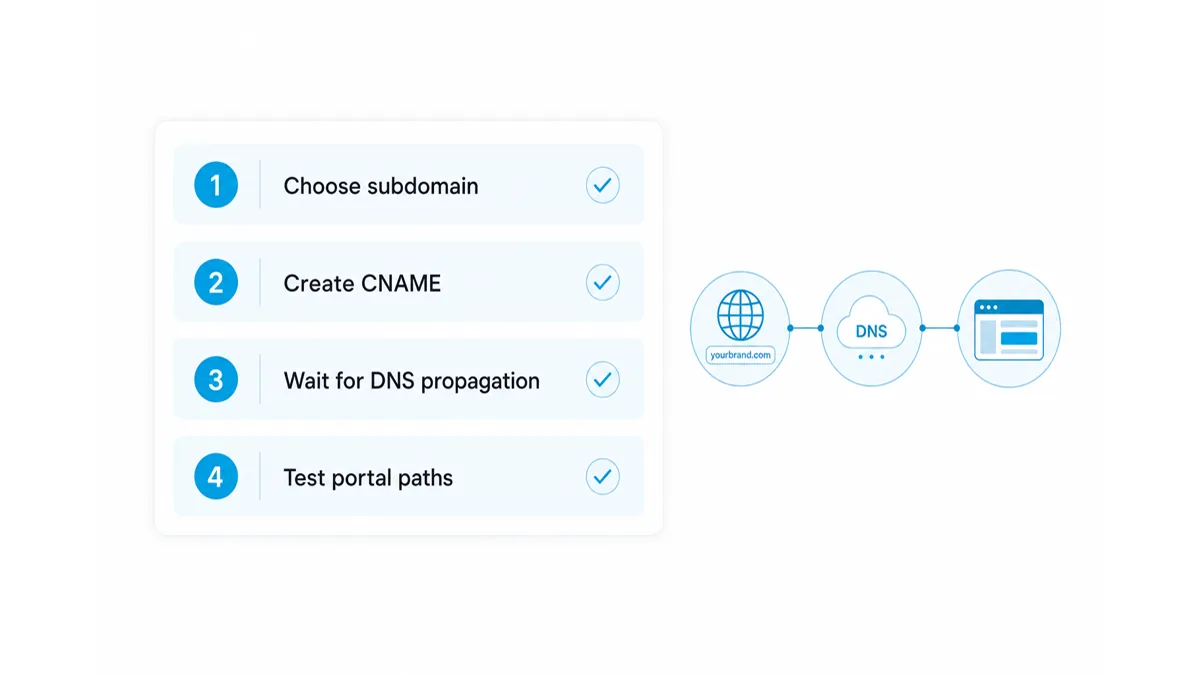
Paso 1: Elige el subdominio
Elige un nombre breve que los clientes puedan reconocer. Entre las opciones más habituales se encuentran: portal, cuenta, mio clientes. En esta guía, utilizamos portal.ejemplo.com.
Paso 2: Abre el gestor de DNS
Inicia sesión en el sistema donde se gestionan los registros DNS de tu dominio. Puede tratarse de tu registrador de dominios, tu proveedor de alojamiento web, tu cuenta de Cloudflare, el panel de DNS de Microsoft 365 u otro servicio de DNS gestionado.
Paso 3: Añadir el registro CNAME
Crea un nuevo registro CNAME con estos valores:
| Campo DNS | Valor | Notas |
|---|---|---|
| Tipo | CNAME | Utiliza CNAME, no A ni AAAA. |
| Name, host, or alias | portal | Use only the subdomain part. Some DNS providers may require the full value portal.ejemplo.com. |
| Target, value, or points to | app.tridenstechnology.com | Enter the hostname only. Do not include https://. |
| TTL | Default | Keep the default value unless your IT team requires something else. |
Save the record. DNS changes often appear within minutes, but propagation can take longer depending on the DNS provider and existing cache.
Step 4: Ask Tridens to activate the portal domain
After the CNAME record is saved, contact your Tridens project or support contact and share the branded portal domain you want to activate. Tridens will connect the domain to your environment and confirm when it is ready to test.
Do not publish the new portal link to customers until activation and testing are complete.
Test the Portal URLs
Once Tridens confirms the domain is active, test the portal as a customer would use it. Start in a private or incognito browser window so cached sessions do not hide configuration issues.
- Open
https://portal.example.com/ev-chargeif you use the EV Charge portal. - Open
https://portal.example.com/monetizationif you use the Monetization portal. - Confirm the page loads over HTTPS and the browser shows a secure connection.
- Check branding, navigation, login, and any customer-facing portal actions.
- Ask another user or internal tester to validate the link from a different network.
If you use analytics or tracking on the portal, confirm the expected events are recorded after the branded domain goes live.
Solución de problemas
Most setup issues come from DNS record conflicts, propagation delays, or entering the target value in the wrong format.
The portal does not load
Check that the CNAME record exists for the exact subdomain you want to use. Also confirm there is no A, AAAA, or another CNAME record using the same subdomain.
The DNS target was entered with HTTPS
DNS records do not use URL protocols. If the target is set as https://app.tridenstechnology.com, replace it with app.tridenstechnology.com.
The branded URL opens the wrong page
Confirm that users are opening the correct path after the domain. The EV Charge portal uses /ev-charge. The Monetization portal uses /monetization.
HTTPS is not ready yet
SSL activation may take time after the domain is connected. If HTTPS still fails after Tridens confirms activation, contact your Tridens support or project contact with the domain name and browser error.
Where To Use Your White-Label Portal URL
After the domain is active and tested, use the branded portal URL anywhere customers expect to manage their account, charging activity, invoices, or portal access.
- Website header and footer links.
- Customer onboarding emails.
- QR codes on printed material or charger instructions.
- Support documentation and help center articles.
- Account management and billing notifications.
Keep the link format consistent. If you use both portal paths, label them clearly so customers know which one to open.
White-label portal URL FAQ
What is a white-label portal URL?
A white-label portal URL is a branded web address that lets customers access a portal through your own domain or subdomain instead of a generic application domain.
What should the CNAME point to?
The CNAME target should point to app.tridenstechnology.com. Enter the hostname only, without https:// in the DNS record.
Can one subdomain open both Tridens portal paths?
Yes, when the portals are enabled and configured for your account, customers can use paths such as /ev-charge and /monetization under the same branded subdomain.
How long does DNS propagation take?
DNS changes often appear within minutes, but propagation can take longer depending on your DNS provider, TTL settings, and cached records.
Should I use the root domain or a subdomain?
Use a subdomain such as portal.example.com. This keeps your main website separate from the Tridens portal and avoids conflicts with existing DNS records.