

Um guia completo para o ajudar a configurar o seu leitor de cartões VPOS Nayax como terminal de pagamento para os seus carregadores de veículos eléctricos.
Este guia destina-se a operadores de pontos de carregamento (CPO) who want to accept on-site card payments on EV chargers with Nayax payment terminals, managed in Carga Tridens EV.

Visão geral rápida
Nayax VPOS works as a POS terminal that takes the driver’s card payment and talks to a POS back office to handle card owner verification and payments.
Nayax back office also communicates with Tridens EV Charge via OCPI (Open Charge Point Interface) protocol to exchange location, charger, tariffs, and session data and stay in sync. This enables the payment terminal to initiate charging sessions, keep track of them, and eventually terminate them, using the cost for payment.

What You Need Before You Start?
As the charge point operator, you need the following before you start:
- Active Tridens EV Charge environment with chargers onboarded.
- Establish an agreement with Nayax to open a new account for card payments, merchant payment processing, acquiring, and settlement.
- Nayax device (e.g., VPOS Touch) physically installed and powered. For all device possibilities, we advise you to check Nayax’s offer.
- Registration token from Nayax.
- Roaming configuration for Nayax, set in Roaming.
- Preços das sessões, fixados em Tarifas de roaming.
How Nayax Terminal Works With Tridens EV Charge
Nayax’s role is the eMobility service provider, abbreviated as eMSP, having the back-office platform and payment terminals, which are also known as Points of Sale or POS.
Meanwhile, operators in the Tridens EV Charge platform have the role of charge point operator (CPO), controlling and monitoring charging locations and infrastructure.
Figure: Add image or video.
Tridens EV Charge exposes your charging network via OCPI, so the Nayax platform with terminals can discover chargers, control sessions, and receive cost information.
Nayax reads payment cards on-site and communicates with its platform to authorize money resources based on the tariff configuration. Once authorized, Nayax requests the charging session to start on Tridens via OCPI. At session end, the final payment amount is captured from the payment card owner.
Pronto para começar?
Saiba como o seu negócio pode prosperar com o Tridens EV Charge.

Nayax Terminal Models
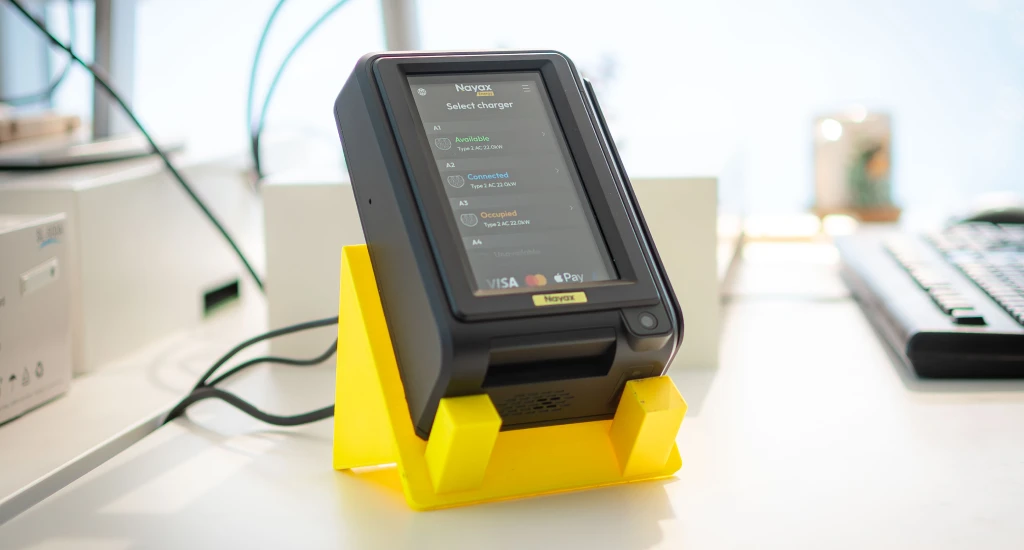
VPOS 5 and VPOS Touch both serve as contactless and card-present terminals suitable for unattended EV charging. For the full list of available models, please check out the latest offer from Nayax. Your terminal model decision may depend on various aspects, considering the environment where it is placed, hardware wiring, and connectivity.

It is possible to use the Nayax payment terminal on a single charger or on multiple chargers as a kiosk.
Configuring Nayax With Tridens EV Charge
Let’s go through the steps required to set up the Nayax payment terminals for EV charging in Tridens EV Charge.
Passo 1: Adicionar perfil de roaming OCPI
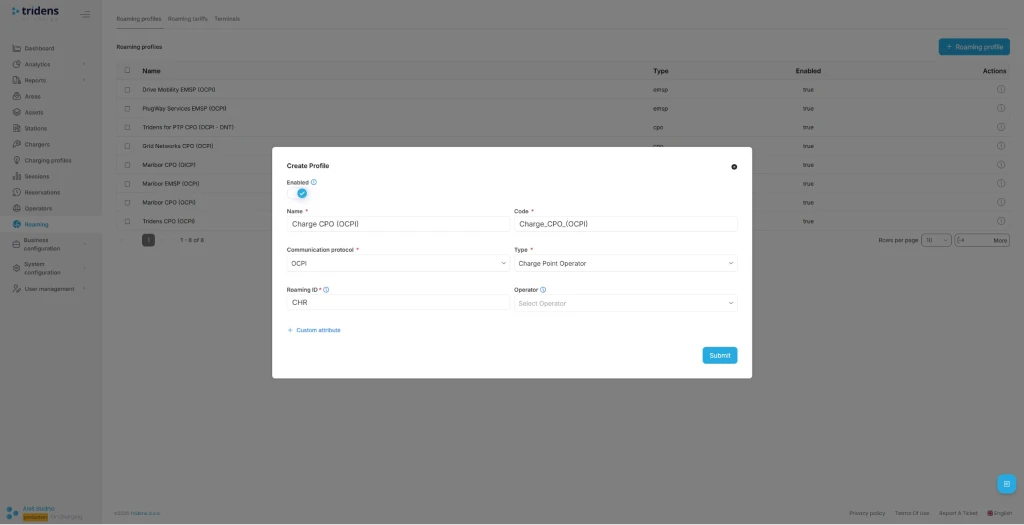
Move to the Tridens EV Charge environment, open Roaming in the left menu, and create or reuse a Roaming Profile with CPO role for the OCPI protocol. Set a recognizable Name and Code of your business, Role, and your three-letter Roaming ID, which will represent you to Nayax.

Step 2: Add Nayax Roaming Platform
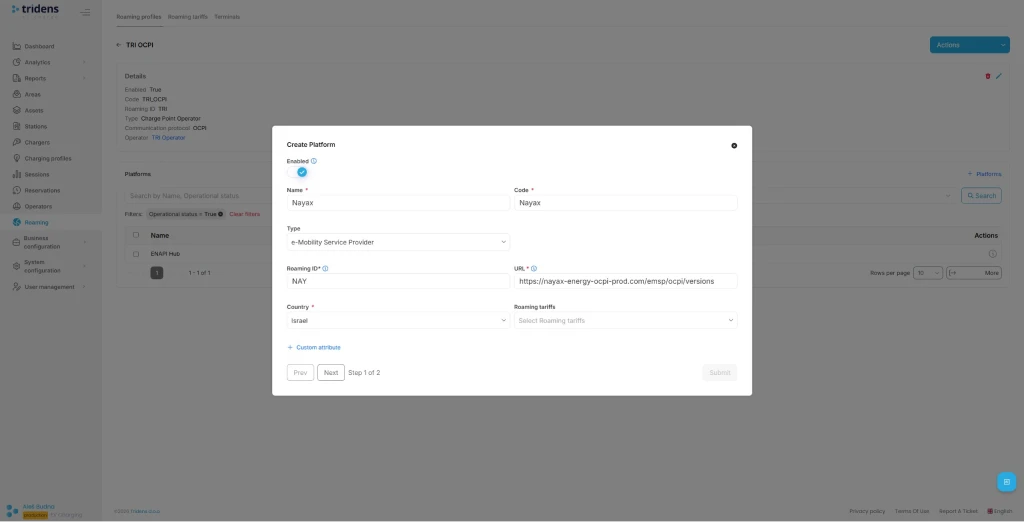
The next step in Tridens EV Charge is to go inside the Roaming Profile and add the Roaming Platform of Nayax.
Fill in Nayax platform’s recognizable Name with Code, select EMSP Type, Roaming ID, URL, and operating Country.
| Field | Recommended value |
|---|---|
| Name | Nayax |
| Tipo | EMSP |
| URL | https://nayax-energy-ocpi-prod.com/emsp/ocpi/versions |
| ID de roaming | NAY |
| País | Israel |
You can add or change Roaming Tariffs later for the cost calculations used for payments.
Passo 3: Utilizar o Token de Registo
In the next step of Roaming Platform configuration, a registration dialogue shows up. Insert the registration token (Token A) provided by Nayax and submit the form.
On the Roaming Platforms overview, select the recently created platform and hit Register Credentials action.
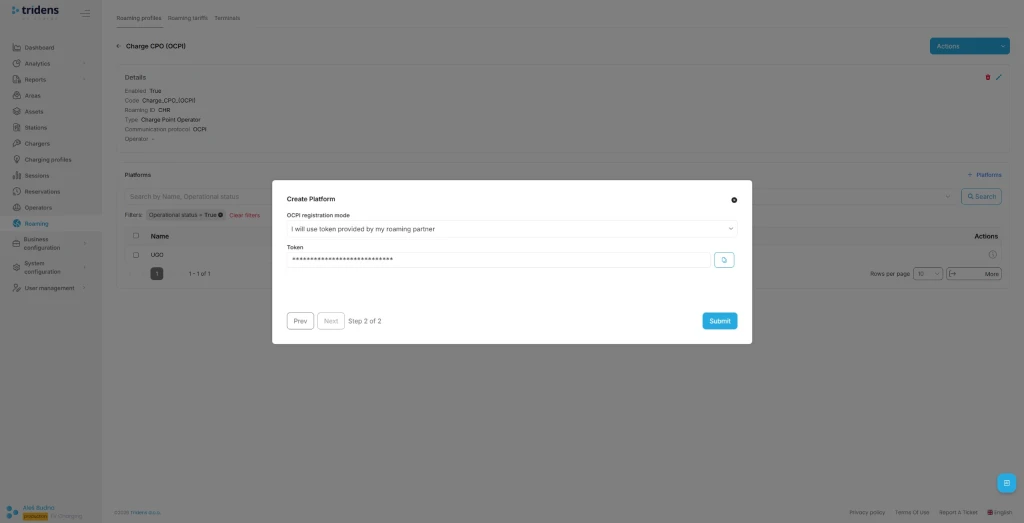
You can later update credentials to renegotiate or Invalidate credentials to stop the communication.
It is also possible to register credentials in the opposite direction, where the new token is generated by Tridens EV Charge at the platform configuration dialogue. If such a principle is used, you need to pass this token from Tridens EV Charge to Nayax support in a secure manner, after which Nayax will do the communication handshake. Use the URL that appears in the dialogue.

Passo 4: Expor a sua infraestrutura de carregamento
You want to expose your charging infrastructure to Nayax. To achieve this, assign a unique Roaming ID for desired Areas, Chargers, and Connectors in Tridens EV Charge and enable roaming on chargers.
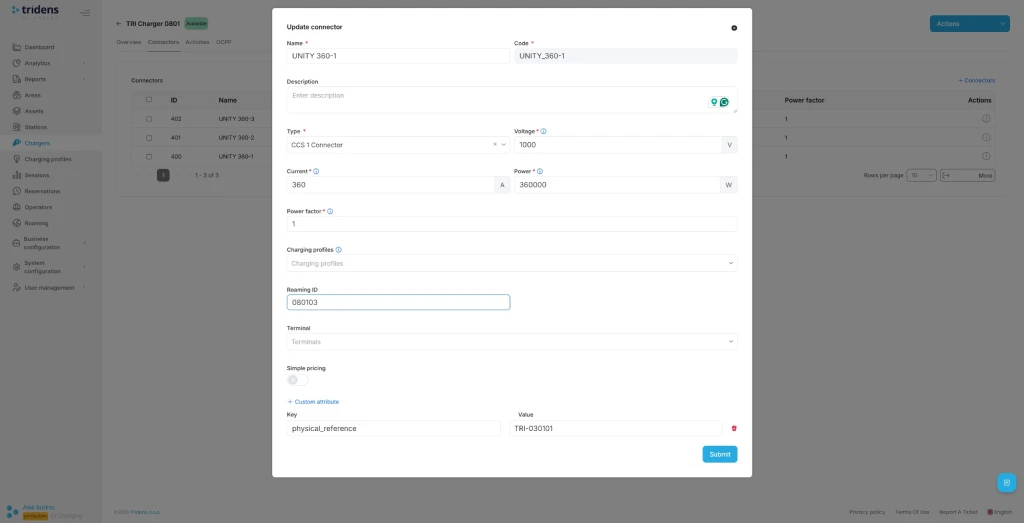
More details about applying the roaming settings on your charging infrastructure in Tridens EV Charge are described at Áreas e Perfis de roaming.
Carregamento inteligente de EV: Desbloqueando todo o seu potencial

Passo 5: Atribuir tarifas de roaming de despesas
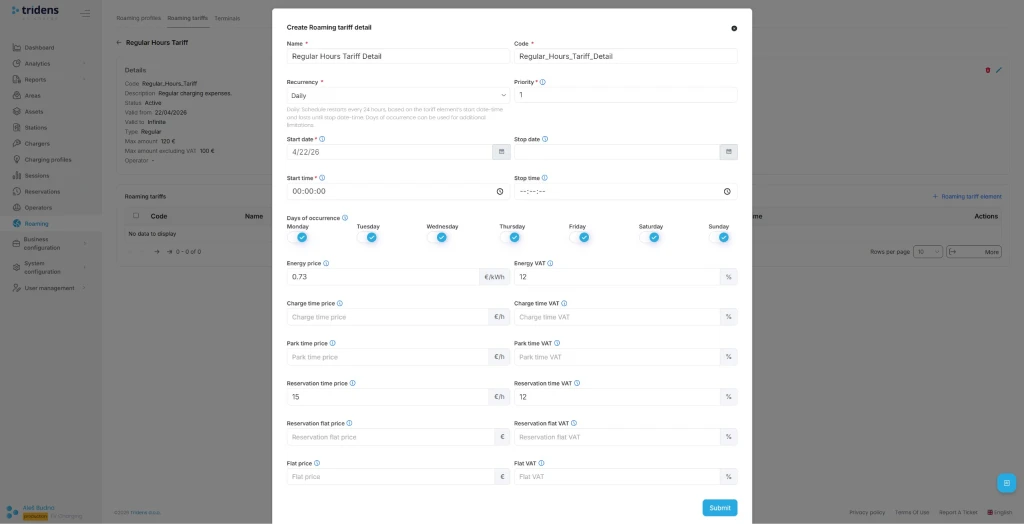
You need to define expense tariffs and prices for calculating the costs of using your chargers. These costs will be used for card payments by Nayax. Tariffs are schedule-based, with recurrence and one-time options. Expenses can be set for energy, charging time, parking time, and general flat fee, including VAT control.
Go to Roaming in the left side menu and select Tariffs, where you need to add a new regular type tariff definition with time validity.
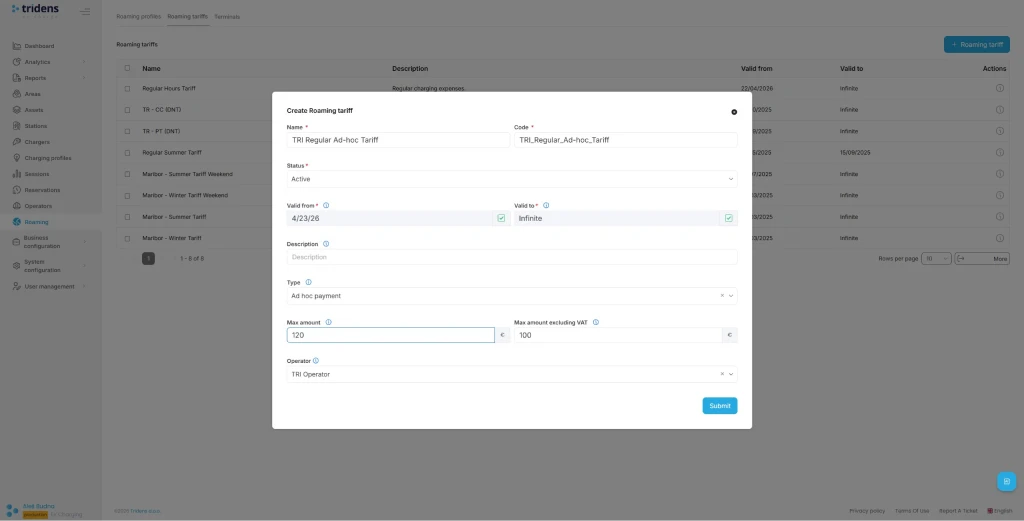
In the next step, add the Tariff Elements with cost (energy, time, flat) and recurrence time settings.
Atribuir Tarifas de roaming on the charging infrastructure context (one of Site/Operator/Area/Charger/Connector) and also to the Roaming Platform of Nayax.
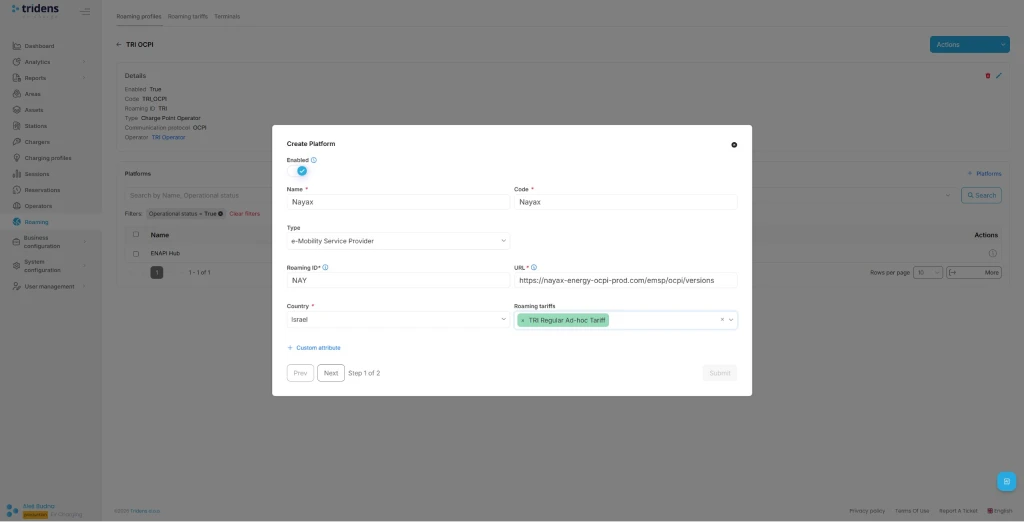
Step 6: Charger and Session Settings for Smooth Operations
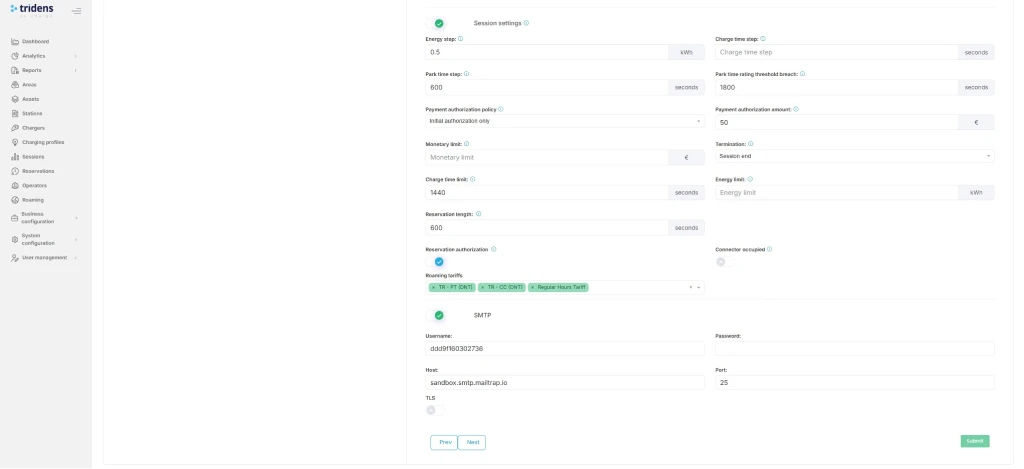
As the CPO, you want to ensure that charging infrastructure events, including session events, are properly exchanged. Thus, the charger configuration in Tridens EV Charge must meet a few important considerations, resulting in events reported at regular intervals with sufficient data (power and energy progression) and covering border cases. This will contribute to payment terminals working properly and external users having a better charging experience.
Algumas regras gerais:
- Set a reasonable meter value reporting interval. We recommend 15 seconds.
- Definir, pelo menos, o reporte dos mensurandos de importação de potência (kW) e de importação de energia (kWh).
- Align charger timeouts with Tridens’ ready-session expiration to avoid dangling sessions.
We advise you to follow the guidelines defined in Integração da sessão de carregamento, and if facing an issue, it is likely you will find the solution for yours in the Mau funcionamento da sessão de carregamento onde são descritos casos comuns com soluções e medidas preventivas.
Testar o caudal total
Once your Nayax terminal is ready with Tridens and Nayax communication established, ensure locations with tariffs are exposed. Then you can proceed to the test flow and try out the charging sessions initiated from the terminal.
Aconselhamo-lo vivamente a testar as seguintes operações:
- Approach the physical terminal of Nayax, plug in your EV, and tap the screen. You should be able to see available locations and chargers bound to this specific terminal and press the button to Start the charging session.
- Select your charger and present your payment card, which will be authorized (reserved) for the amount, as agreed with Nayax.
- If payment authorization succeeds, the charging of EV should start soon.
- Verify that the session is charging and that you can see the progress on Tridens EV Charge portal in the Sessions section.
- Parar a sessão no terminal apresentando novamente o cartão de pagamento.
- The payment terminal must show the receipt.
- Verify that amounts are properly calculated on the receipt and on Tridens EV Charge portal in Sessions based on your desired Roaming Tariffs configuration.
- Confirm that the amount is properly captured from the payment account, while the remaining reservation amount is released.
- We encourage you to thoroughly test the border cases:
- No charging expenses, for example if no energy is charged to EV. Expect the authorized payment amount to be released.
- Charging above the max. limit. The terminal is expected to automatically stop the session when the agreed max. amount threshold is achieved.
- Invalid authorization of payment card. Charging prevented.
- Request the stop of charging session from different sources: Tridens EV Charge portal, electric vehicle, terminal, charger’s emergency button. Confirm all scenarios end up in a properly completed session with payment capture.
- Modo de quiosque ou modo de carregador único. Depende do seu caso de utilização.
Resolução de Problemas
| Occurrences | Razões | Solução |
|---|---|---|
| Locations and charger data not in sync. | Mau funcionamento das credenciais. | Repita o processo de registo e aperto de mão descrito no passo 3. |
| Locations and charger data not in sync. | Network connectivity issue. | Ensure both platforms are communicating. Check out the status pages. Contact the platform operators, if necessary. Tridens Status Page |
| Locations and charger data not in sync. | Roaming desativado. | Ensure roaming settings are enabled in Tridens EV Charge environment: Roaming Profile, Roaming Platform and roaming settings of Area, Charger, Connector. |
| Tariffs do not appear in the Nayax terminal. Custo não calculado na sessão. | Configuração das tarifas de roaming. | Ensure that Roaming Tariffs are properly configured in Tridens EV Charge with valid date-times and cost. Tariff must then be applied to the Roaming Platform and charging infrastructure scope (e.g., Site or Charger). Tarifas de roaming |
| Questões relativas ao progresso da sessão se for o CPO. | Operações do carregador ou definições do sistema. | Consulte o Mau funcionamento da sessão de carregamento with a list of the most common issues and resolutions with preventive measures. Also advised to verify the Integração da sessão de carregamento guia. |
| O terminal não está a responder. Não é possível iniciar a sessão de carregamento a partir do terminal. Nenhum pedido é transmitido ao CPO. | Problema de software do terminal. | Attempt to restart the terminal by the button or by unplugging the cable. If the on/off switch doesn’t help, we recommend checking the device’s user manual. When necessary, contact Nayax support to verify the firmware. |
Se está a ter problemas em colocar o seu terminal em funcionamento, não se debata em silêncio! Não hesite em fale connosco, e nós ajudamo-lo a configurar tudo e a prepará-lo para o carregamento.
Perguntas frequentes
How do I activate Nayax terminal for EV charging?
Make agreement with Nayax, then go into Tridens EV Charge and configure the roaming platform, exchange the registration token and register credentials. Assign area, chargers and connectors for roaming, including tariffs.
Can I use the Nayax payment terminal as a kiosk?
Yes, you can use the Nayax payment terminal as a kiosk covering multiple chargers at once.
How long does the onboarding take?
You make an agreement with Nayax in a matter of days, then proceed with setup in your Tridens EV Charge environment, by following the steps in this article to make a connection, which should not take more than an hour. Then you need to assign roaming identifiers on areas, chargers, and connectors, including tariffs. Longevity depends on how many charging infrastructure entries and different tariffs you need to manage. Thorough tests are strongly advised.
How does Nayax terminal work?
Nayax terminal reads the payment card, reserves the customer money, and requests Tridens over OCPI to start the charging session. At the end of session, total cost amount is captured from the reservation, while the rest of amount is released.
How secure is the setup?
Payment card related data is not exchanged between Nayax and Tridens, since the card account verification and captures are domain of Nayax. Tridens and Nayax communication by OCPI goes with HTTPS calls, where each side verifies the other to have a trusted certificate that provides encrypted communication. Another level of OCPI security is applied by using the mandatory access tokens in each request. Access token is negotiated at the initial registration and is being verified at each further message exchange between the sides. Communication access can be renewed or discarded at any time by using Tridens EV Charge portal.
How do I upgrade OCPI version?
Version of OCPI protocol used between Tridens and Nayax can be renegotiated to the latest mutual by first invalidating the credentials of the roaming platform, then assigning the new registration token (Token A) and triggering the registration process, as described in Step 3.
How do I update the Nayax terminal?
Follow the documentation of your Nayax device model. If necessary, contact the Nayax support.