

Eco-Movement integration helps charge point operators share charger location, tariff, and availability data from Tridens EV Charge with major navigation and mapping services.
For CPOs, public visibility is operational. Drivers need to find chargers, check availability, understand the cost, and navigate to the right location. If that data stays inside the charging management system, the network is harder to discover.
This guide explains how to connect Tridens EV Charge con Eco-Movement via OCPI, what you need before you start, and which setup checks matter before exposing charging infrastructure to external map and navigation providers.

Visión general rápida
Eco-Movement and Tridens EV Charge are different participants in the roaming network. Tridens EV Charge provides hosting services for CPOs, while Eco-Movement serves as the aggregator of charging-point data, which can then be visible to navigation service providers.
Interoperability is achieved by using the Interfaz abierta de puntos de carga (OCPI) communication protocol.

What You Need Before Start?
Para establecer la integración como CPO, necesitarás:
- An active Tridens EV Charge environment with chargers onboarded.
- Establecer un acuerdo with Eco-Movement to participate within navigation services for the charging locations visibility to external drivers.
- Roaming configuration for Eco-Movement in Tridens EV Charge. Set in Itinerancia.
- Generate registration token in Tridens EV Charge and send it to Eco-Movement integration contact.
- Informal pricing tariffs for the charging session expenses, as set in Tarifas de itinerancia.
¿Listo para empezar?
See how Tridens EV Charge connects charger operations, roaming, tariff data, and billing in one platform.

How Does Eco-Movement Communicate with Tridens EV Charge?
OCPI protocol is used for communication between Tridens EV Charge and Eco-Movement service.
Once the initial handshake and registration between the platforms succeed, the platforms start exchanging relevant information about the locations, chargers, and tariffs.
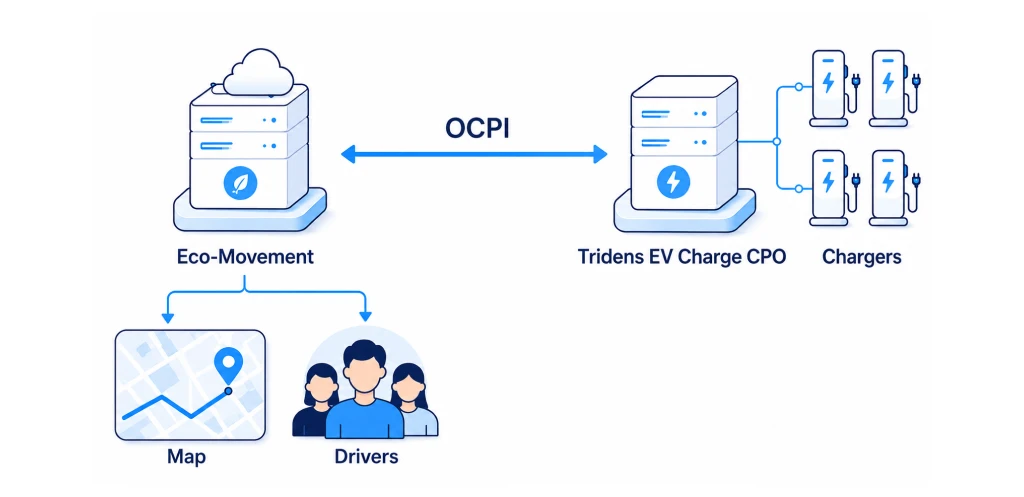
CPO publishes locations and charging infrastructure data with wholesale tariffs for ad-hoc or general charging expenses to Eco-Movement.
The integration does not make Eco-Movement an EMSP that starts and controls charging sessions. Drivers still start charging through the options enabled by the CPO, such as card payment, RFID, Plug & Charge, or the provider’s mobile app.

Configuring Eco-Movement with Tridens EV Charge
Let’s dive into the steps required to set up the Eco-Movement communication in Tridens EV Charge.
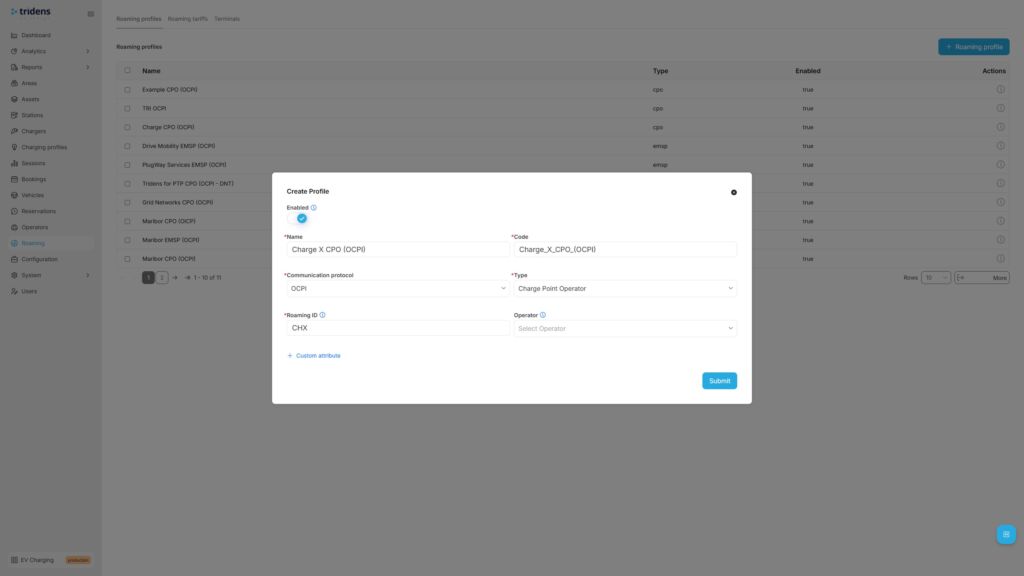
Paso 1: Añadir perfil de itinerancia OCPI
Move to Tridens EV Charge environment, open Roaming in the left menu and create or reuse the Perfil de itinerancia which represents your CPO papel de la OCPI protocol. Set recognizable Name and Code of your business, select OCPI protocol, Role, and your three-letter ID de itinerancia which will represent you in the roaming network.
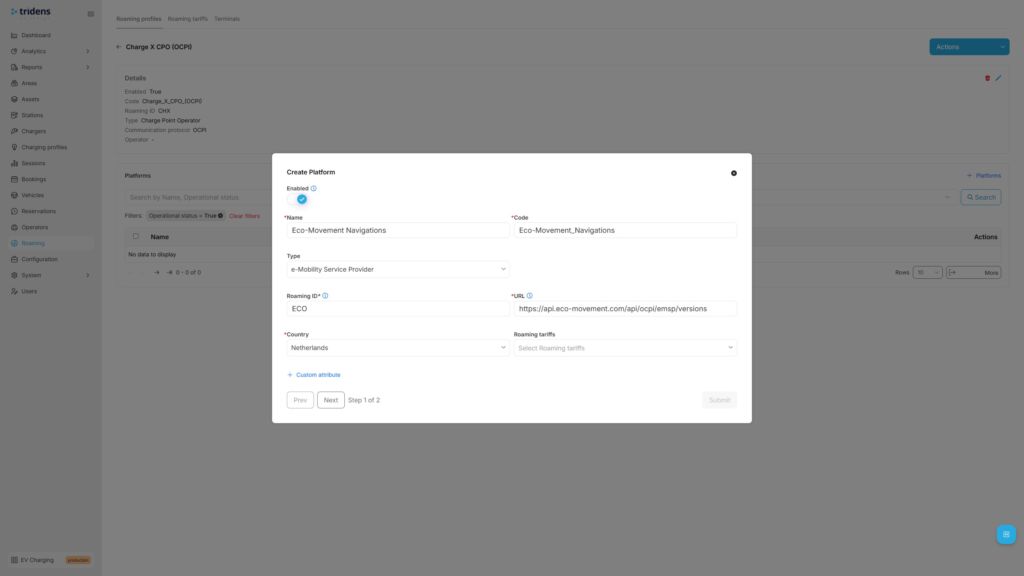
Step 2: Add Eco-Movement Roaming Platform
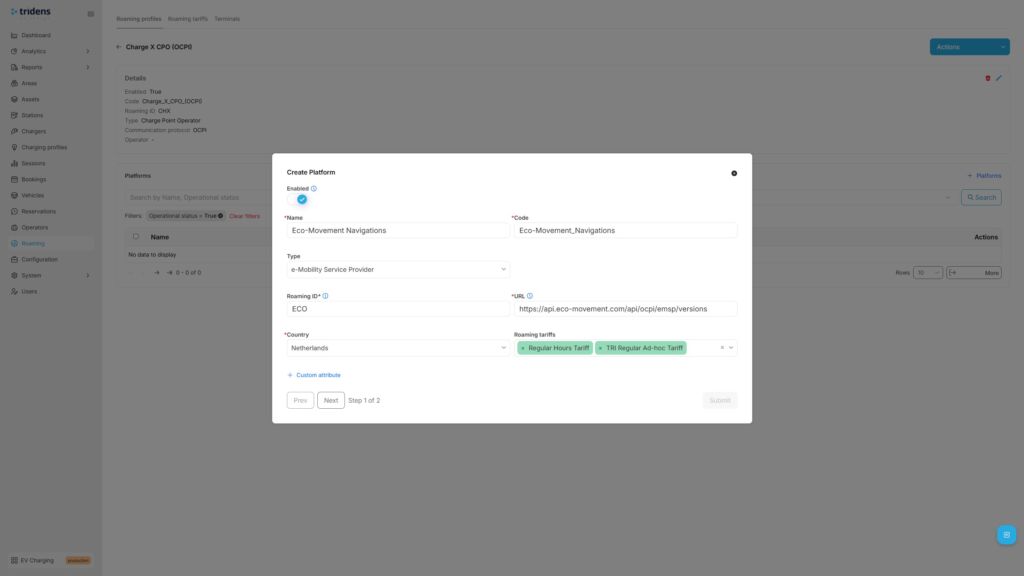
Next step in Tridens EV Charge is to go inside the Roaming Profile and add the Plataforma de itinerancia of Eco-Movement.
Fill in Eco-Movement platform’s recognizable Name with Code, select NSP o EMSP Type, Eco-Movement’s ID de itinerancia, URL and operating Country.
Eco-Movement’s recommended settings:
| Field | Recommended value |
|---|---|
| Name | Eco-Movement |
| Tipo | NSP or EMSP |
| URL | https://api.eco-movement.com/api/ocpi/emsp/versions |
| ID de itinerancia | ECO |
| País | Países Bajos |
As a CPO, you can optionally add Tarifas de itinerancia later for the wholesale expenses calculation of using the chargers.

Step 3: Provide Token & Register with Handshake
In the next step of Roaming Platform configuration, registration dialogue shows up. Generate the registration token, forward it to Eco-Movement team and Enviar el formulario.
At this point, Eco-Movement can do the handshake to start communicating with Tridens EV Charge.
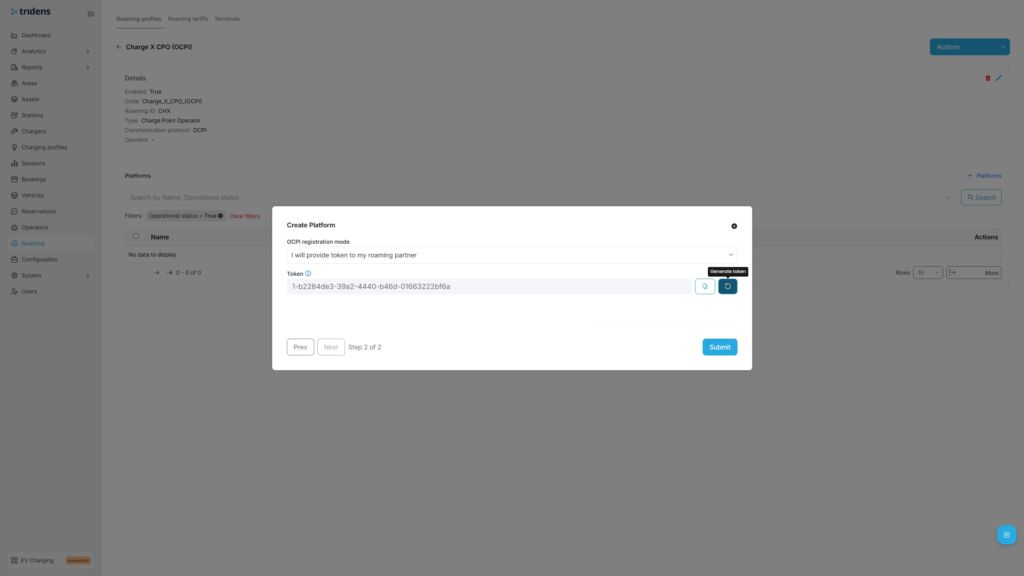
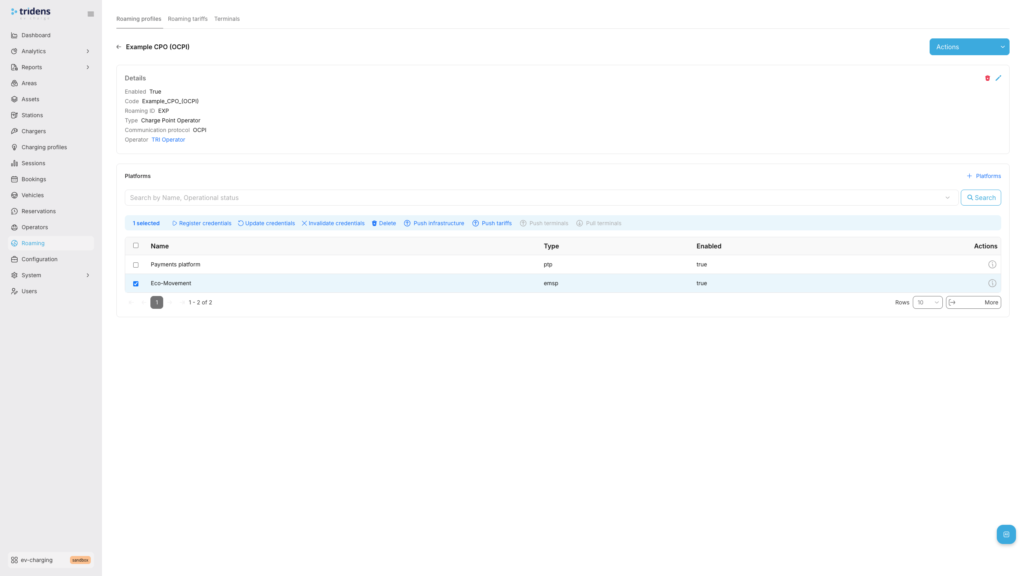
Más tarde podrá Actualizar credenciales renegociar o Invalidar credenciales para detener la comunicación.
If interested to register credentials in the opposite direction, you can ask Eco-Movement team to provide you the registration token, which you can insert in the registration form (instead of generating) and hit Registrar credenciales.
Carga inteligente de VE: Liberar todo su potencial

Step 4: Expose the Charging Infrastructure
As a CPO, you want to expose your locations and charging infrastructure to the public. To achieve this, add unique ID de itinerancia para Zona, Cargador y Conector and enable roaming on chargers. You can expose all your locations and chargers in roaming or just cherry-pick a few, decision is yours.
Vaya a Zonas in the left side menu and then select and edit the desired Area with roaming settings. From the Area, you can navigate downstream to the Estación, Cargador y Conector, por lo que se pueden asignar ajustes de itinerancia en los dos últimos.
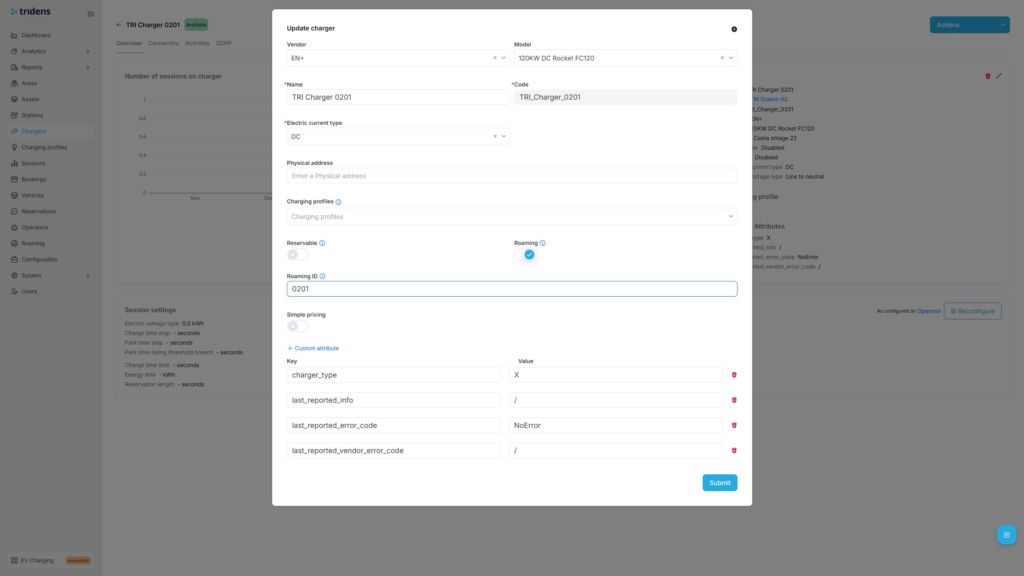
More details on applying the roaming settings on your charging infrastructure in Tridens EV Charge is described at Zonas y Perfiles de itinerancia.
Initially, we advise you to trigger the first full push of locations and charging infrastructure to the Eco-Movement by navigating to the Plataforma de itinerancia for Eco-Movement, selecting it and triggering the Push infrastructure action. Further updated of your Area/Chargers/Connectors, including status updates will automatically be notified to Eco-Movement to reflect the latest state.
Step 5: Define Expense Tariffs
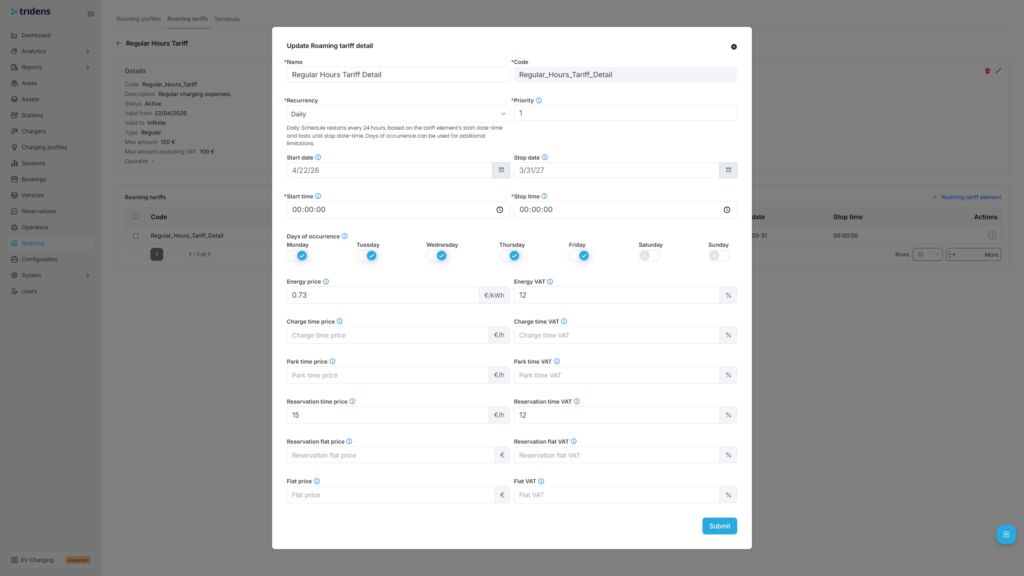
As a CPO, you would potentially want to inform the drivers about the pricing, whether in general or ad-hoc based (card payments) for the cost expenses of using your chargers. Tariffs are schedule-based, with recurrency and one-time options. Expenses can be configured for energy, charging time, parking time, reservation time, reservation flat and general flat fee, including VAT control and the upper amount limitation.
Ir a Itinerancia en el menú de la izquierda y seleccione Aranceles, where you can add new tariff definition first and then apply tariff details, covering different time ranges with cost rules.
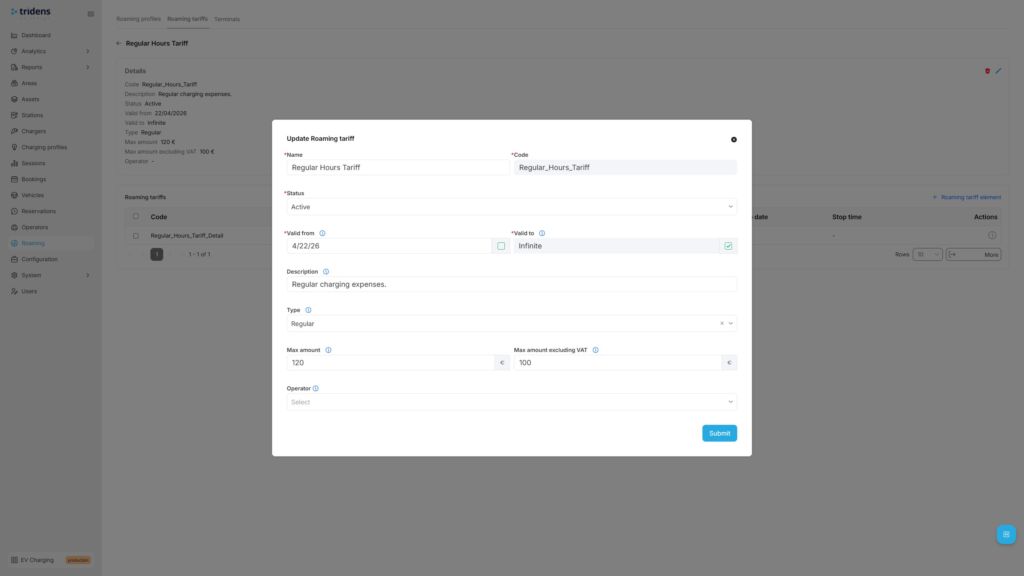
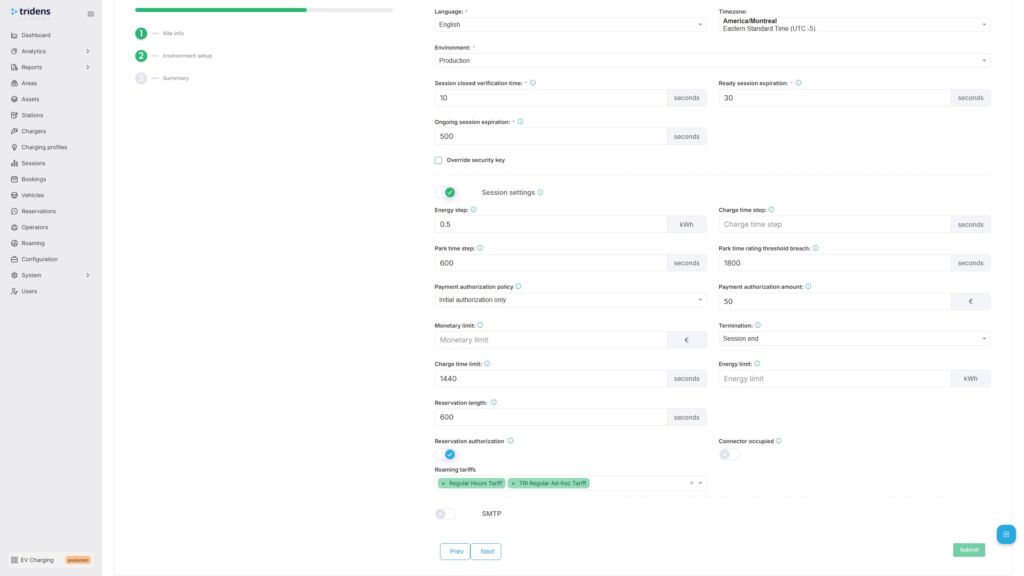
A continuación, es necesario asignar tarifas de itinerancia en el Plataforma de itinerancia and belonging charging infrastructure as described in Tarifas de itinerancia.
Pruebe el flujo total
Once the communication with Eco-Movement is established by the registration handshake, you can proceed to the test flow.
Test flow for a CPO:
- Confirm that each Area with Chargers and Connectors that you want to expose to Eco-Movement has ID de itinerancia assigned and that each such Charger has a itinerancia flag enabled.
- Push locations and charging infrastructure by using the Push infrastructure action of Plataforma de itinerancia. Further data updates will happen automatically on data changes, including status change.
- Confirm with Eco-Movement whether all the desired locations and charging infrastructure with tariffs (if used) are visible at Eco-Movement.
Solución de problemas
| Occurrence | Razones | Solución |
|---|---|---|
| Locations and chargers data not in-sync | Mal funcionamiento de las credenciales | Repita el proceso de registro y apretón de manos descrito en el paso 3. |
| Problema de conectividad a la red | Ensure both platforms are communicating. Check out the status pages. Contact the platform operators, if necessary. Tridens Status Page | |
| Itinerancia desactivada | Ensure roaming settings are still enabled in Tridens EV Charge environment: Roaming Profile, Roaming Platform and roaming settings of Area, Charger and Connector. | |
| Tariffs do not appear at Eco-Movement | Configuración de la tarifa de itinerancia | Ensure that Roaming Tariff is properly configured in Tridens EV Charge with valid date-time scopes and cost. Tariff must then be applied to the Roaming Platform and charging infrastructure scope. Tarifas de itinerancia |
Connect charger visibility, roaming, and billing with Tridens
Eco-Movement integration gives CPOs a practical way to make their charging infrastructure easier to find. Tridens EV Charge provides operators with the control layer behind that visibility: charger management, OCPI roaming, tariffs, billing, and customer operations on a single platform.
For CPOs scaling beyond manual operations, that matters. Public visibility is only useful if the underlying charger, tariff, and availability data stay accurate.
FAQ about Eco-Movement integration
How do I activate Eco-Movement integration with Tridens EV Charge?
First, make an agreement with Eco-Movement. Then configure the roaming profile and Eco-Movement roaming platform in Tridens EV Charge, exchange the registration token, and register credentials.
Can I choose which chargers are exposed to Eco-Movement?
Yes. You can control which areas, chargers, and connectors are exposed by assigning roaming IDs and enabling roaming only where needed.
How long does onboarding take?
The Tridens EV Charge setup can be completed quickly once the required data is ready. Eco-Movement and downstream navigation provider onboarding may take longer and can depend on provider timelines.
How secure is the OCPI setup?
OCPI communication uses HTTPS and access tokens. The access token is negotiated during registration and verified in later message exchanges.
Can drivers start charging sessions through Eco-Movement?
No. Eco-Movement aggregates charging location, tariff, and availability data. Charging sessions still start through the CPO’s enabled payment, identification, or mobile app options.