

Eco-Movement integration helps charge point operators share charger location, tariff, and availability data from Tridens EV Charge with major navigation and mapping services.
For CPOs, public visibility is operational. Drivers need to find chargers, check availability, understand the cost, and navigate to the right location. If that data stays inside the charging management system, the network is harder to discover.
This guide explains how to connect Tridens EV Charge 와 함께 Eco-Movement via OCPI, what you need before you start, and which setup checks matter before exposing charging infrastructure to external map and navigation providers.

빠른 개요
Eco-Movement and Tridens EV Charge are different participants in the roaming network. Tridens EV Charge provides hosting services for CPOs, while Eco-Movement serves as the aggregator of charging-point data, which can then be visible to navigation service providers.
Interoperability is achieved by using the 개방형 충전소 인터페이스(OCPI) communication protocol.

What You Need Before Start?
CPO로서 통합을 설정하려면 다음이 필요합니다:
- An active Tridens EV Charge environment with chargers onboarded.
- 계약 설정 with Eco-Movement to participate within navigation services for the charging locations visibility to external drivers.
- Roaming configuration for Eco-Movement in Tridens EV Charge. Set in 로밍.
- Generate registration token in Tridens EV Charge and send it to Eco-Movement integration contact.
- Informal pricing tariffs for the charging session expenses, as set in 로밍 요금.
시작할 준비가 되셨나요?
See how Tridens EV Charge connects charger operations, roaming, tariff data, and billing in one platform.

How Does Eco-Movement Communicate with Tridens EV Charge?
OCPI protocol is used for communication between Tridens EV Charge and Eco-Movement service.
Once the initial handshake and registration between the platforms succeed, the platforms start exchanging relevant information about the locations, chargers, and tariffs.
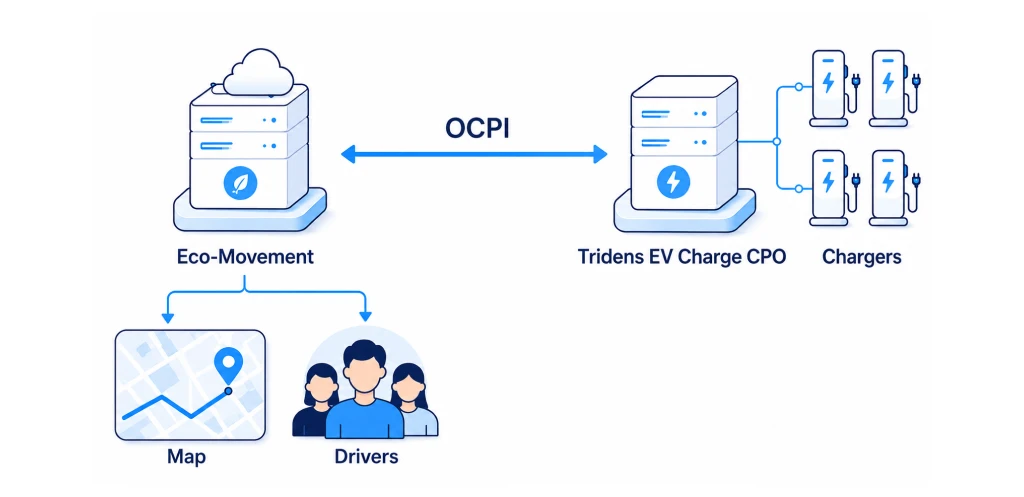
CPO publishes locations and charging infrastructure data with wholesale tariffs for ad-hoc or general charging expenses to Eco-Movement.
The integration does not make Eco-Movement an EMSP that starts and controls charging sessions. Drivers still start charging through the options enabled by the CPO, such as card payment, RFID, Plug & Charge, or the provider’s mobile app.

Configuring Eco-Movement with Tridens EV Charge
Let’s dive into the steps required to set up the Eco-Movement communication in Tridens EV Charge.
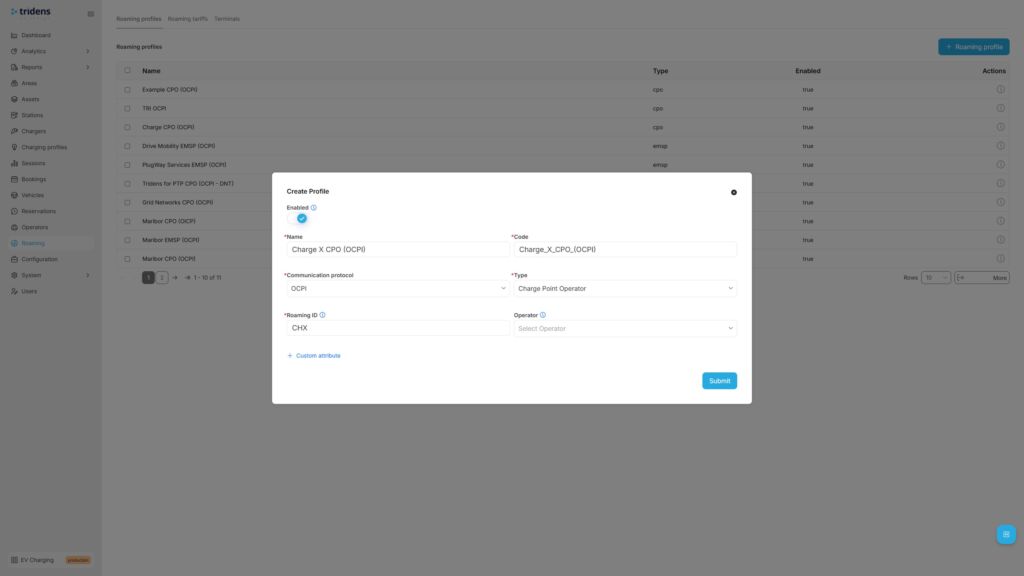
1단계: OCPI 로밍 프로필 추가하기
Move to Tridens EV Charge environment, open Roaming in the left menu and create or reuse the 로밍 프로필 which represents your CPO 역할에 대한 OCPI protocol. Set recognizable Name and Code of your business, select OCPI protocol, Role, and your three-letter 로밍 ID which will represent you in the roaming network.
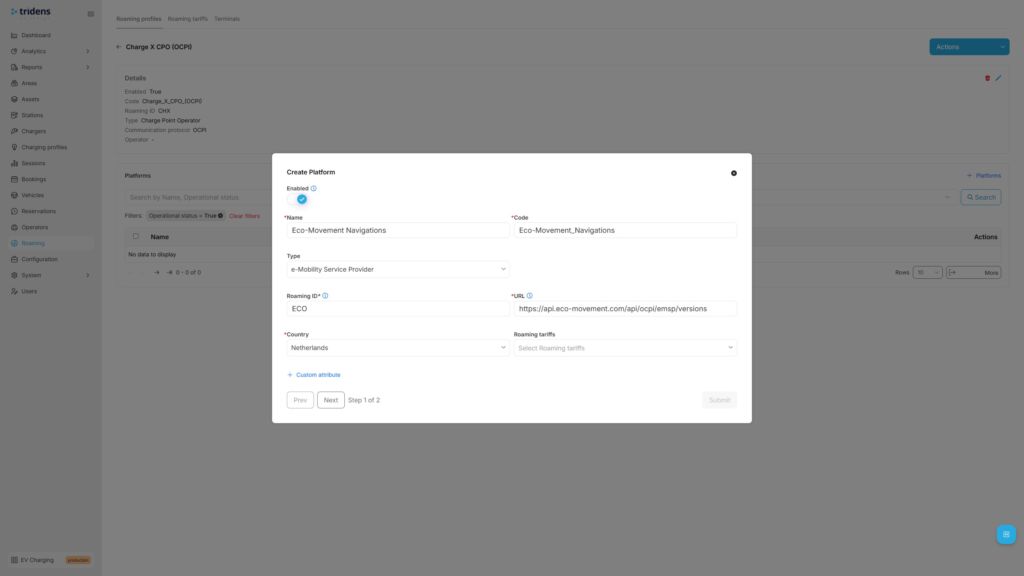
Step 2: Add Eco-Movement Roaming Platform
Next step in Tridens EV Charge is to go inside the Roaming Profile and add the 로밍 플랫폼 of Eco-Movement.
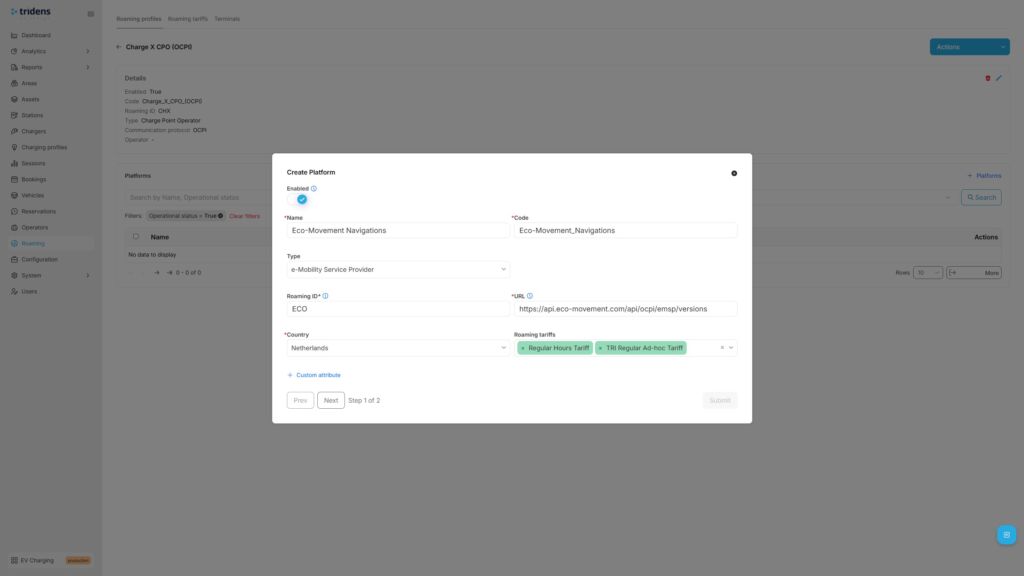
Fill in Eco-Movement platform’s recognizable Name with Code, select NSP 또는 EMSP Type, Eco-Movement’s 로밍 ID, URL and operating Country.
Eco-Movement’s recommended settings:
| Field | Recommended value |
|---|---|
| 이름 | Eco-Movement |
| 유형 | NSP or EMSP |
| URL | https://api.eco-movement.com/api/ocpi/emsp/versions |
| 로밍 ID | ECO |
| 국가 | 네덜란드 |
As a CPO, you can optionally add 로밍 요금 later for the wholesale expenses calculation of using the chargers.

Step 3: Provide Token & Register with Handshake
In the next step of Roaming Platform configuration, registration dialogue shows up. Generate the registration token, forward it to Eco-Movement team and 제출하기 양식을 입력합니다.
At this point, Eco-Movement can do the handshake to start communicating with Tridens EV Charge.
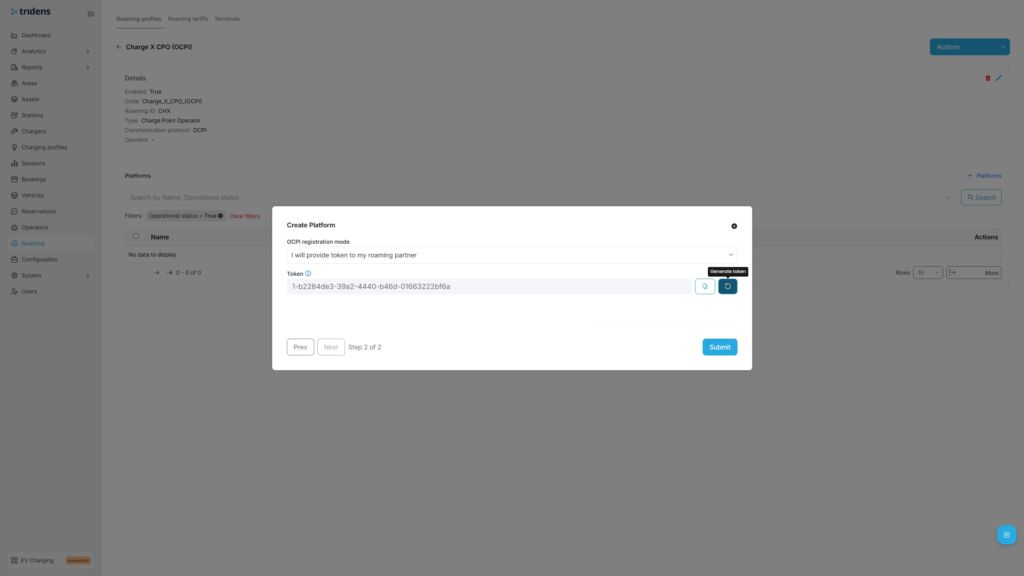
나중에 자격 증명 업데이트 재협상 또는 자격 증명 무효화 를 클릭하여 통신을 중지합니다.
If interested to register credentials in the opposite direction, you can ask Eco-Movement team to provide you the registration token, which you can insert in the registration form (instead of generating) and hit 자격 증명 등록.
스마트 전기차 충전: 잠재력을 최대한 활용하기

Step 4: Expose the Charging Infrastructure
As a CPO, you want to expose your locations and charging infrastructure to the public. To achieve this, add unique 로밍 ID 에 대한 영역, 충전기 그리고 커넥터 and enable roaming on chargers. You can expose all your locations and chargers in roaming or just cherry-pick a few, decision is yours.
다음으로 이동합니다. 영역 in the left side menu and then select and edit the desired Area with roaming settings. From the Area, you can navigate downstream to the 스테이션, 충전기 그리고 커넥터, 로 로밍 설정을 지정할 수 있습니다.
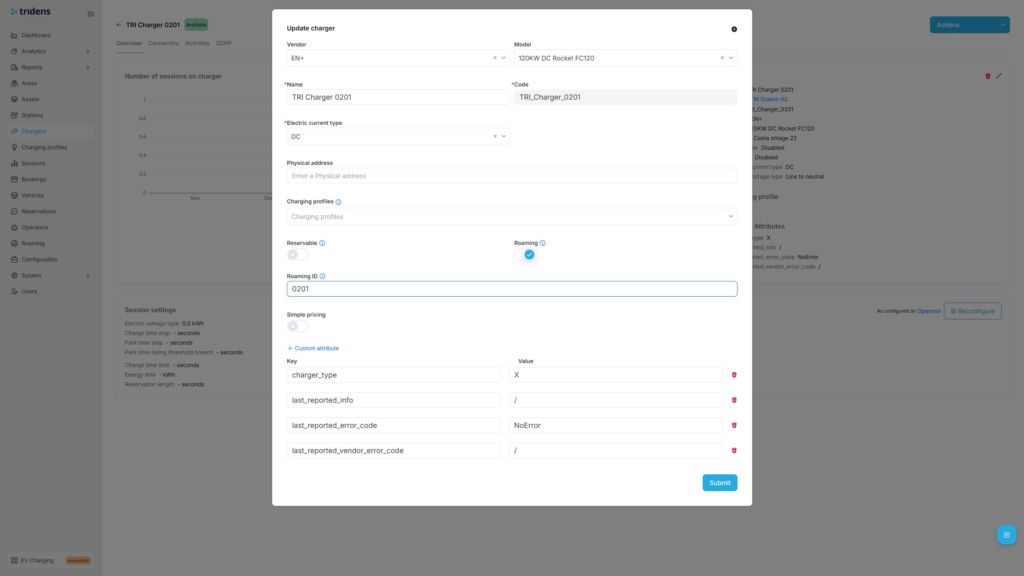
More details on applying the roaming settings on your charging infrastructure in Tridens EV Charge is described at 영역 그리고 로밍 프로필.
Initially, we advise you to trigger the first full push of locations and charging infrastructure to the Eco-Movement by navigating to the 로밍 플랫폼 for Eco-Movement, selecting it and triggering the Push infrastructure action. Further updated of your Area/Chargers/Connectors, including status updates will automatically be notified to Eco-Movement to reflect the latest state.
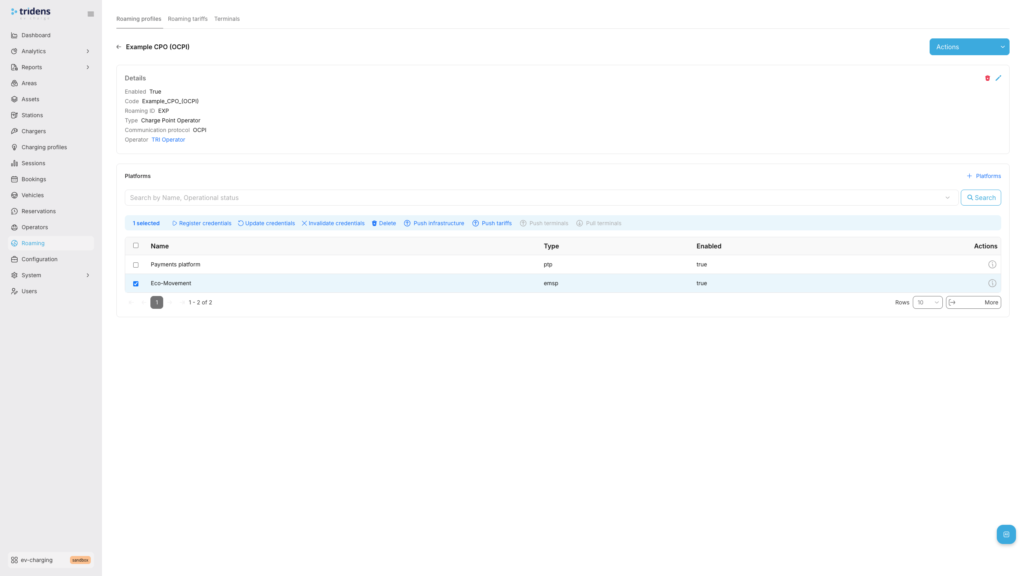
Step 5: Define Expense Tariffs
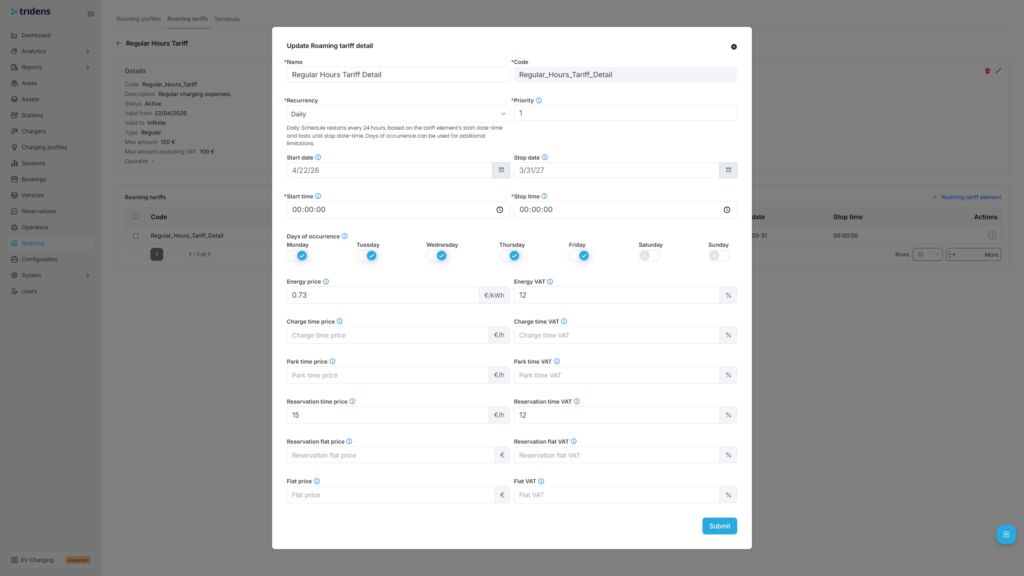
As a CPO, you would potentially want to inform the drivers about the pricing, whether in general or ad-hoc based (card payments) for the cost expenses of using your chargers. Tariffs are schedule-based, with recurrency and one-time options. Expenses can be configured for energy, charging time, parking time, reservation time, reservation flat and general flat fee, including VAT control and the upper amount limitation.
다음으로 이동 로밍 을 클릭하고 왼쪽 메뉴에서 관세, where you can add new tariff definition first and then apply tariff details, covering different time ranges with cost rules.
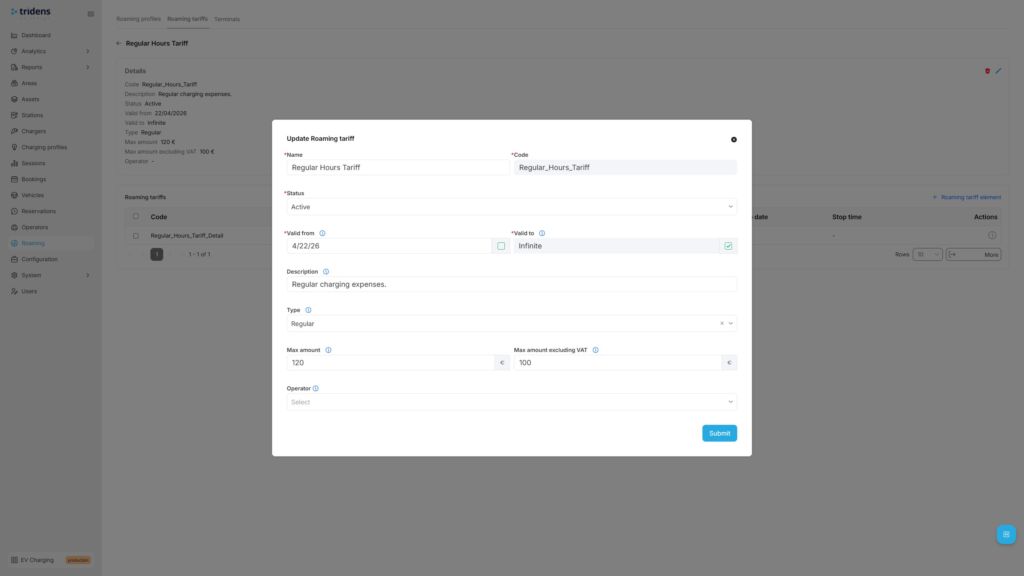
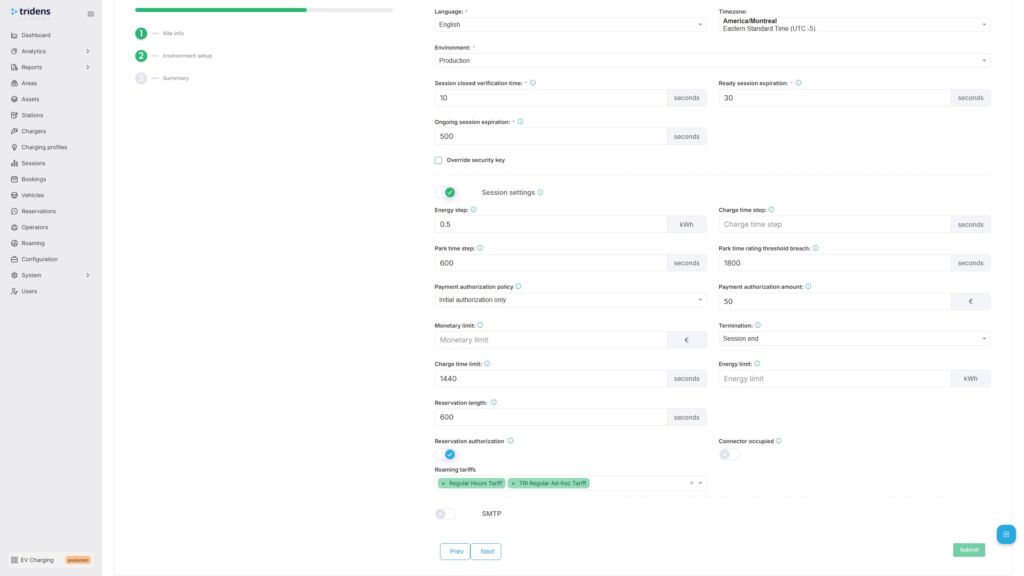
로밍 요금은 다음에서 지정해야 합니다. 로밍 플랫폼 and belonging charging infrastructure as described in 로밍 요금.
전체 흐름 테스트
Once the communication with Eco-Movement is established by the registration handshake, you can proceed to the test flow.
Test flow for a CPO:
- Confirm that each Area with Chargers and Connectors that you want to expose to Eco-Movement has 로밍 ID assigned and that each such Charger has a 로밍 flag enabled.
- Push locations and charging infrastructure by using the Push infrastructure action of 로밍 플랫폼. Further data updates will happen automatically on data changes, including status change.
- Confirm with Eco-Movement whether all the desired locations and charging infrastructure with tariffs (if used) are visible at Eco-Movement.
문제 해결
| Occurrence | 이유 | 솔루션 |
|---|---|---|
| Locations and chargers data not in-sync | 자격 증명 오작동 | 3단계에서 설명한 등록 및 악수 과정을 반복합니다. |
| 네트워크 연결 문제 | Ensure both platforms are communicating. Check out the status pages. Contact the platform operators, if necessary. Tridens Status Page | |
| 로밍 비활성화 | Ensure roaming settings are still enabled in Tridens EV Charge environment: Roaming Profile, Roaming Platform and roaming settings of Area, Charger and Connector. | |
| Tariffs do not appear at Eco-Movement | 로밍 요금 구성 | Ensure that Roaming Tariff is properly configured in Tridens EV Charge with valid date-time scopes and cost. Tariff must then be applied to the Roaming Platform and charging infrastructure scope. 로밍 요금 |
Connect charger visibility, roaming, and billing with Tridens
Eco-Movement integration gives CPOs a practical way to make their charging infrastructure easier to find. Tridens EV Charge provides operators with the control layer behind that visibility: charger management, OCPI roaming, tariffs, billing, and customer operations on a single platform.
For CPOs scaling beyond manual operations, that matters. Public visibility is only useful if the underlying charger, tariff, and availability data stay accurate.
FAQ about Eco-Movement integration
How do I activate Eco-Movement integration with Tridens EV Charge?
First, make an agreement with Eco-Movement. Then configure the roaming profile and Eco-Movement roaming platform in Tridens EV Charge, exchange the registration token, and register credentials.
Can I choose which chargers are exposed to Eco-Movement?
Yes. You can control which areas, chargers, and connectors are exposed by assigning roaming IDs and enabling roaming only where needed.
How long does onboarding take?
The Tridens EV Charge setup can be completed quickly once the required data is ready. Eco-Movement and downstream navigation provider onboarding may take longer and can depend on provider timelines.
How secure is the OCPI setup?
OCPI communication uses HTTPS and access tokens. The access token is negotiated during registration and verified in later message exchanges.
Can drivers start charging sessions through Eco-Movement?
No. Eco-Movement aggregates charging location, tariff, and availability data. Charging sessions still start through the CPO’s enabled payment, identification, or mobile app options.