

Eco-Movement integration helps charge point operators share charger location, tariff, and availability data from Tridens EV Charge with major navigation and mapping services.
For CPOs, public visibility is operational. Drivers need to find chargers, check availability, understand the cost, and navigate to the right location. If that data stays inside the charging management system, the network is harder to discover.
This guide explains how to connect トリデンスEVチャージ と Eco-Movement via OCPI, what you need before you start, and which setup checks matter before exposing charging infrastructure to external map and navigation providers.

概要
Eco-Movement and Tridens EV Charge are different participants in the roaming network. Tridens EV Charge provides hosting services for CPOs, while Eco-Movement serves as the aggregator of charging-point data, which can then be visible to navigation service providers.
Interoperability is achieved by using the オープン・チャージ・ポイント・インターフェース(OCPI) communication protocol.

What You Need Before Start?
CPOとしての統合を確立するためには、以下のことが必要となる:
- An active Tridens EV Charge environment with chargers onboarded.
- 合意形成 with Eco-Movement to participate within navigation services for the charging locations visibility to external drivers.
- Roaming configuration for Eco-Movement in Tridens EV Charge. Set in ローミング.
- Generate registration token in Tridens EV Charge and send it to Eco-Movement integration contact.
- Informal pricing tariffs for the charging session expenses, as set in ローミング料金.
準備はいいですか?
See how Tridens EV Charge connects charger operations, roaming, tariff data, and billing in one platform.

How Does Eco-Movement Communicate with Tridens EV Charge?
OCPI protocol is used for communication between Tridens EV Charge and Eco-Movement service.
Once the initial handshake and registration between the platforms succeed, the platforms start exchanging relevant information about the locations, chargers, and tariffs.
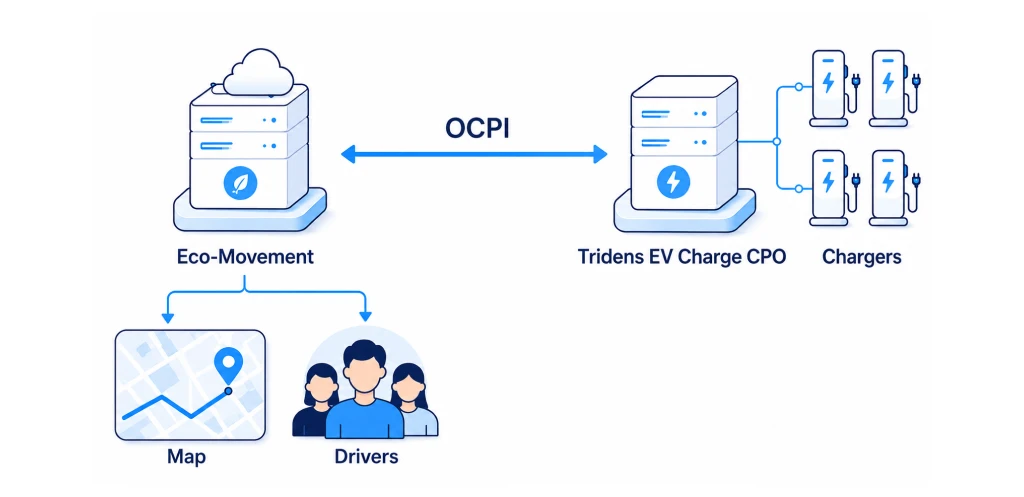
CPO publishes locations and charging infrastructure data with wholesale tariffs for ad-hoc or general charging expenses to Eco-Movement.
The integration does not make Eco-Movement an EMSP that starts and controls charging sessions. Drivers still start charging through the options enabled by the CPO, such as card payment, RFID, Plug & Charge, or the provider’s mobile app.

Configuring Eco-Movement with Tridens EV Charge
Let’s dive into the steps required to set up the Eco-Movement communication in Tridens EV Charge.
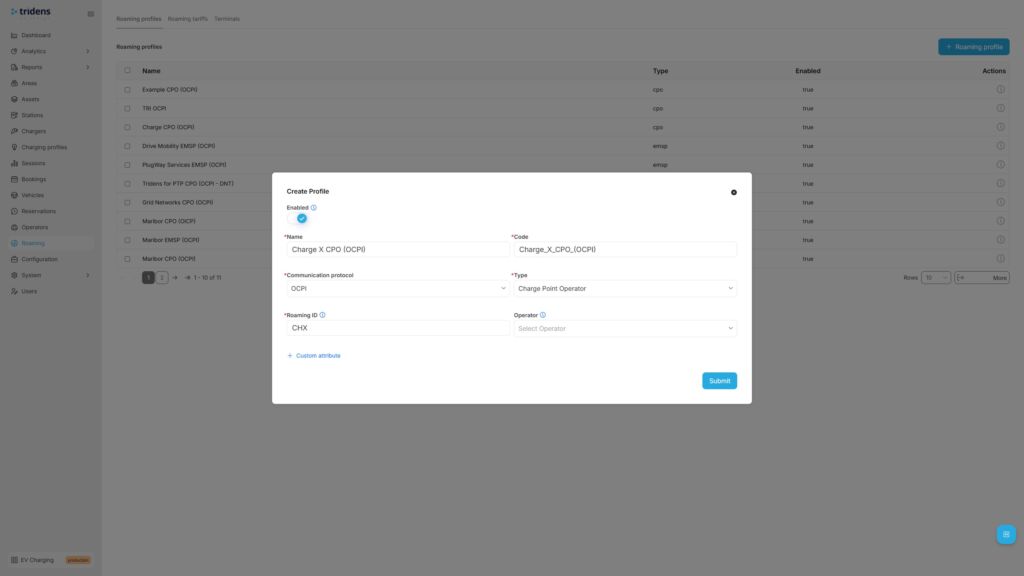
ステップ1:OCPIローミング・プロファイルの追加
Move to Tridens EV Charge environment, open Roaming in the left menu and create or reuse the ローミング・プロフィール which represents your シーピーオー の役割である。 オーシーピーアイ protocol. Set recognizable Name and Code of your business, select OCPI protocol, Role, and your three-letter ローミングID which will represent you in the roaming network.
Step 2: Add Eco-Movement Roaming Platform
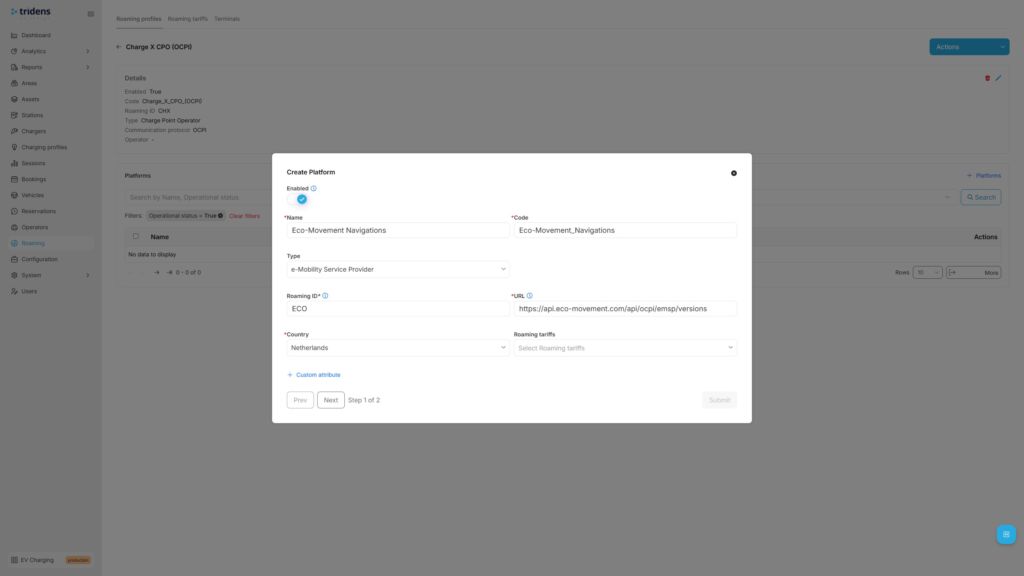
Next step in Tridens EV Charge is to go inside the Roaming Profile and add the ローミング・プラットフォーム of Eco-Movement.
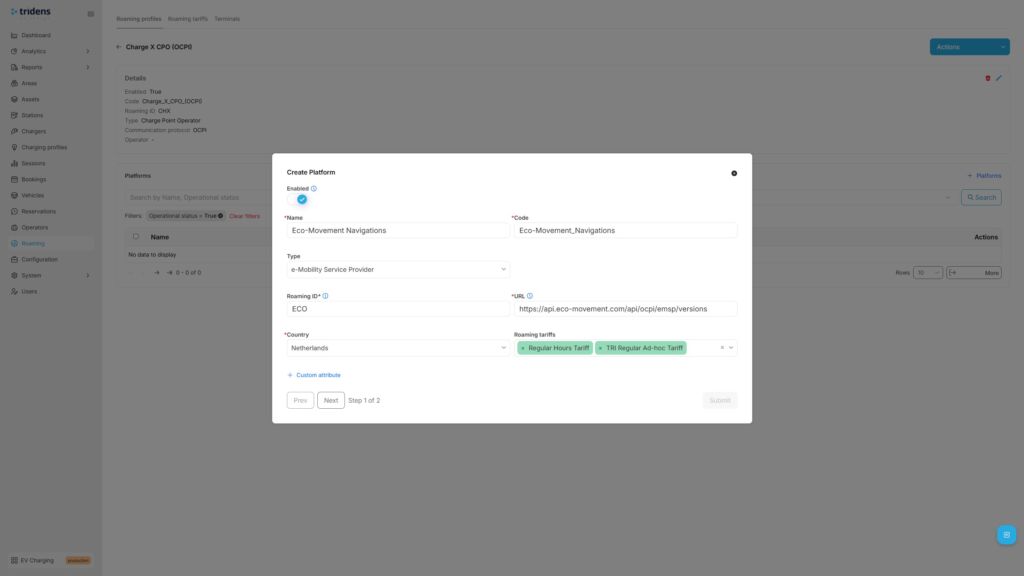
Fill in Eco-Movement platform’s recognizable Name with Code, select エヌエスピー または おうしゅうちゅうおうぎんこうせいど Type, Eco-Movement’s ローミングID, URL and operating Country.
Eco-Movement’s recommended settings:
| Field | Recommended value |
|---|---|
| Name | Eco-Movement |
| タイプ | NSP or EMSP |
| URL | https://api.eco-movement.com/api/ocpi/emsp/versions |
| ローミングID | ECO |
| 国名 | オランダ |
As a CPO, you can optionally add ローミング料金 later for the wholesale expenses calculation of using the chargers.

Step 3: Provide Token & Register with Handshake
In the next step of Roaming Platform configuration, registration dialogue shows up. Generate the registration token, forward it to Eco-Movement team and 投稿 という形だ。.
At this point, Eco-Movement can do the handshake to start communicating with Tridens EV Charge.
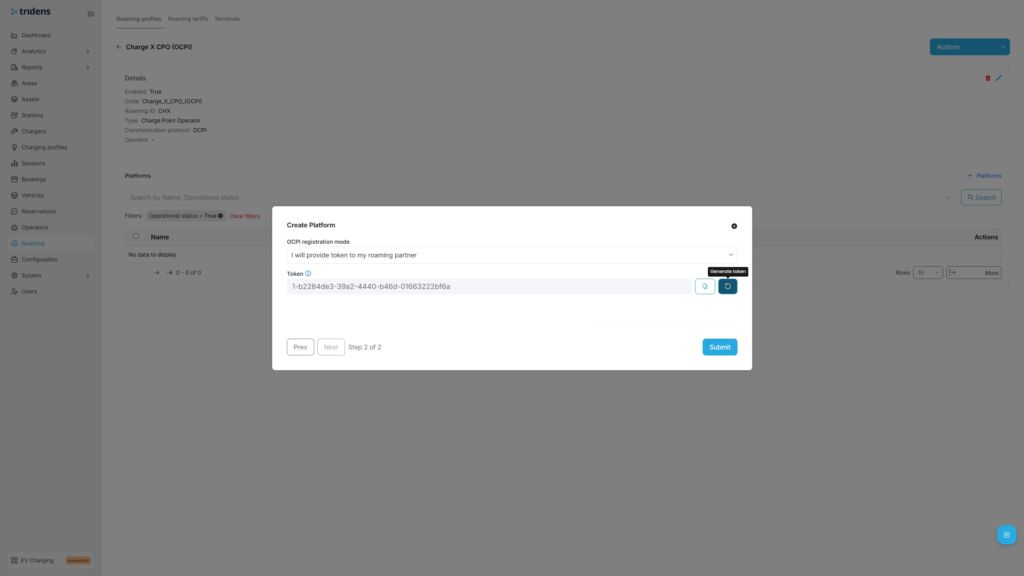
後で 認証情報の更新 再交渉または 認証情報の無効化 で通信を停止する。.
If interested to register credentials in the opposite direction, you can ask Eco-Movement team to provide you the registration token, which you can insert in the registration form (instead of generating) and hit 資格登録.
スマートEVチャージング:その可能性を最大限に引き出す

Step 4: Expose the Charging Infrastructure
As a CPO, you want to expose your locations and charging infrastructure to the public. To achieve this, add unique ローミングID にとって エリア, チャージャー と コネクタ and enable roaming on chargers. You can expose all your locations and chargers in roaming or just cherry-pick a few, decision is yours.
に移動する。 地域 in the left side menu and then select and edit the desired Area with roaming settings. From the Area, you can navigate downstream to the 駅, チャージャー と コネクタ, そのため、後者の2つにはローミング設定を割り当てることができる。.
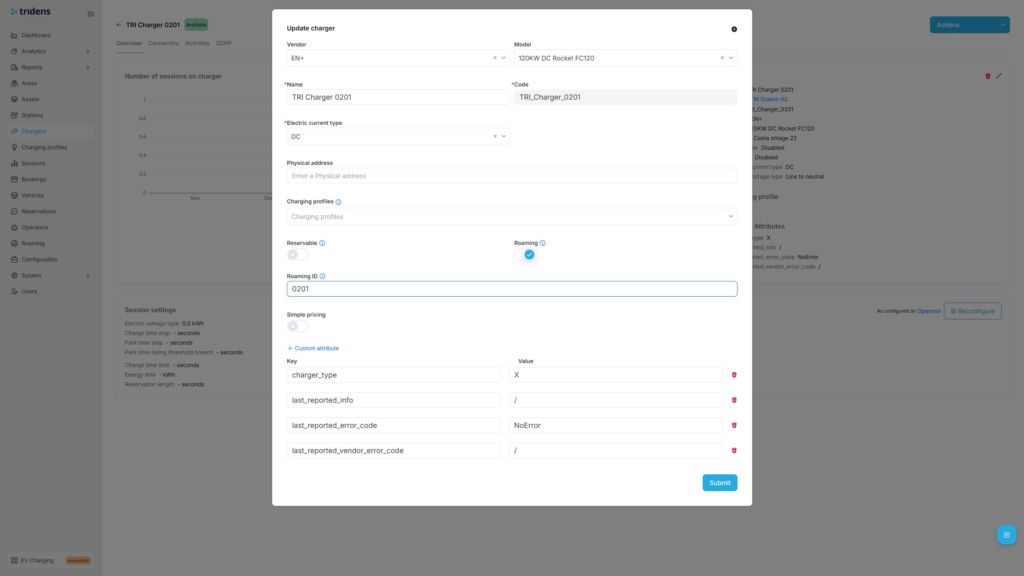
More details on applying the roaming settings on your charging infrastructure in Tridens EV Charge is described at 地域 と ローミング・プロファイル.
Initially, we advise you to trigger the first full push of locations and charging infrastructure to the Eco-Movement by navigating to the ローミング・プラットフォーム for Eco-Movement, selecting it and triggering the Push infrastructure action. Further updated of your Area/Chargers/Connectors, including status updates will automatically be notified to Eco-Movement to reflect the latest state.
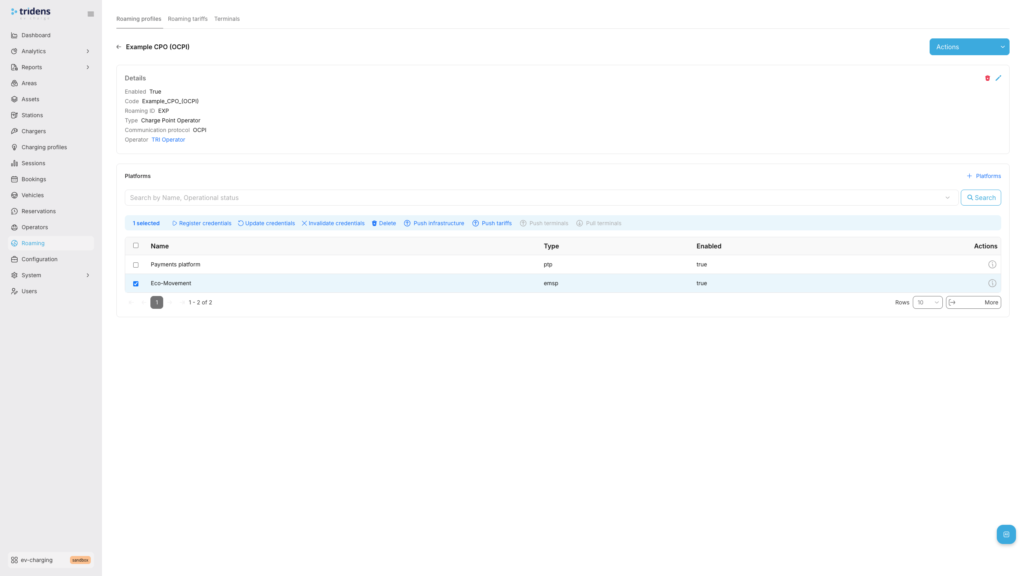
Step 5: Define Expense Tariffs
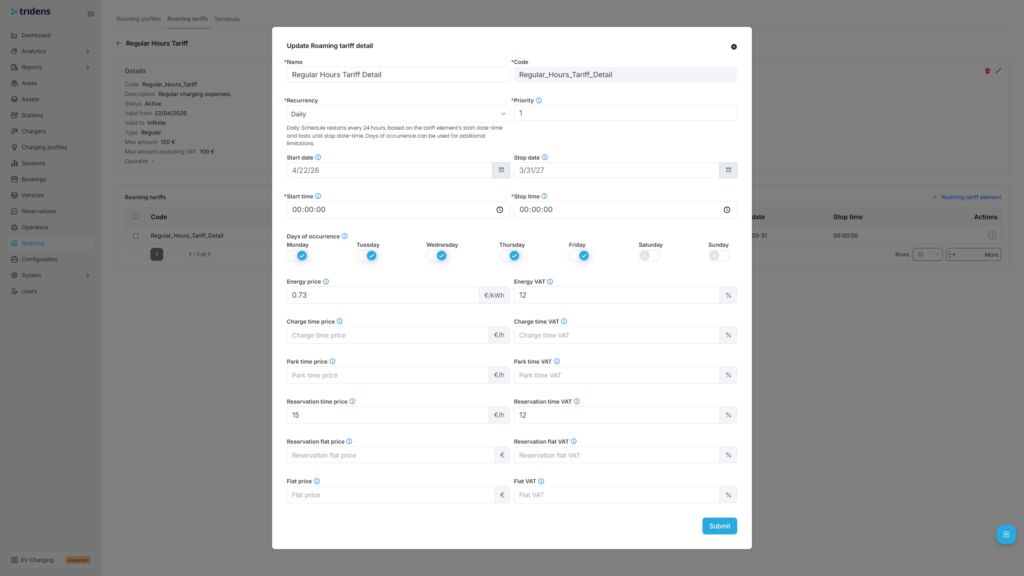
As a CPO, you would potentially want to inform the drivers about the pricing, whether in general or ad-hoc based (card payments) for the cost expenses of using your chargers. Tariffs are schedule-based, with recurrency and one-time options. Expenses can be configured for energy, charging time, parking time, reservation time, reservation flat and general flat fee, including VAT control and the upper amount limitation.
こちらへ ローミング を選択します。 関税, where you can add new tariff definition first and then apply tariff details, covering different time ranges with cost rules.
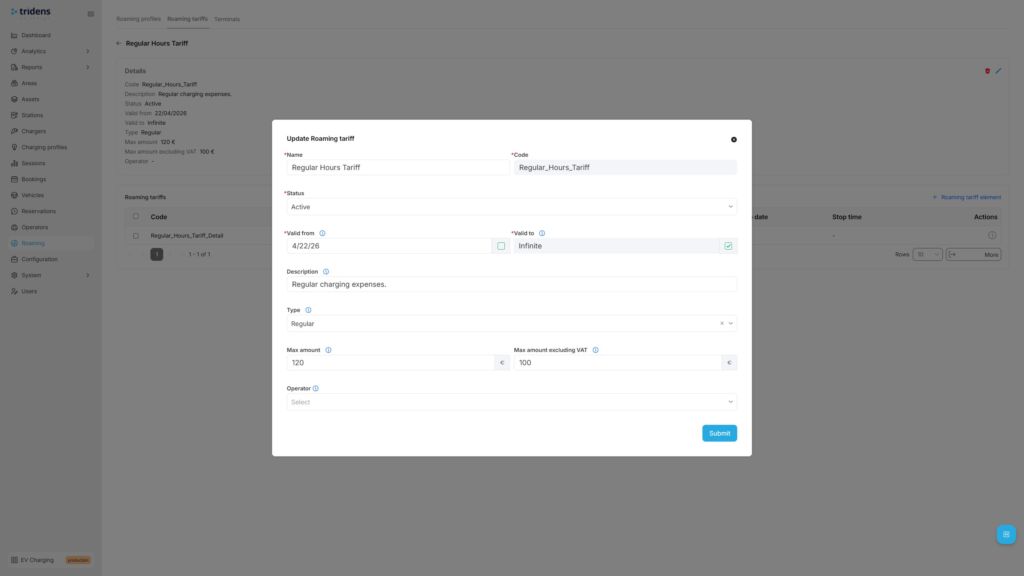
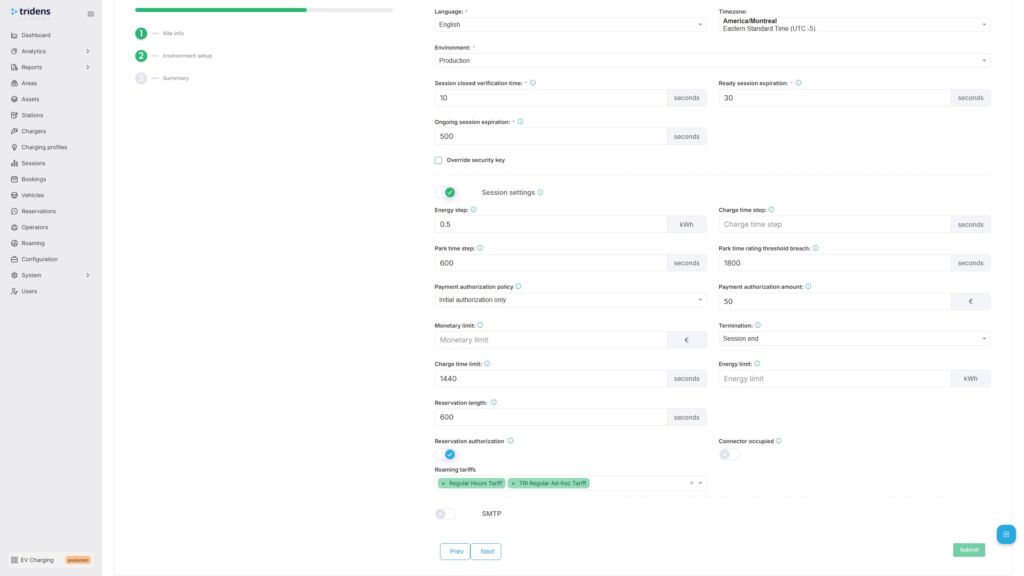
ローミング料金表は、次のように割り当てられる必要がある。 ローミング・プラットフォーム and belonging charging infrastructure as described in ローミング料金.
フルフローテスト
Once the communication with Eco-Movement is established by the registration handshake, you can proceed to the test flow.
Test flow for a CPO:
- Confirm that each Area with Chargers and Connectors that you want to expose to Eco-Movement has ローミングID assigned and that each such Charger has a 徘徊 flag enabled.
- Push locations and charging infrastructure by using the Push infrastructure action of ローミング・プラットフォーム. Further data updates will happen automatically on data changes, including status change.
- Confirm with Eco-Movement whether all the desired locations and charging infrastructure with tariffs (if used) are visible at Eco-Movement.
トラブルシューティング
| Occurrence | 理由 | 解決方法 |
|---|---|---|
| Locations and chargers data not in-sync | クレデンシャルの不具合 | ステップ3で説明した登録とハンドシェイクのプロセスを繰り返します。. |
| ネットワーク接続の問題 | Ensure both platforms are communicating. Check out the status pages. Contact the platform operators, if necessary. Tridens Status Page | |
| ローミング不可 | Ensure roaming settings are still enabled in Tridens EV Charge environment: Roaming Profile, Roaming Platform and roaming settings of Area, Charger and Connector. | |
| Tariffs do not appear at Eco-Movement | ローミング料金設定 | Ensure that Roaming Tariff is properly configured in Tridens EV Charge with valid date-time scopes and cost. Tariff must then be applied to the Roaming Platform and charging infrastructure scope. ローミング料金 |
Connect charger visibility, roaming, and billing with Tridens
Eco-Movement integration gives CPOs a practical way to make their charging infrastructure easier to find. Tridens EV Charge provides operators with the control layer behind that visibility: charger management, OCPI roaming, tariffs, billing, and customer operations on a single platform.
For CPOs scaling beyond manual operations, that matters. Public visibility is only useful if the underlying charger, tariff, and availability data stay accurate.
FAQ about Eco-Movement integration
How do I activate Eco-Movement integration with Tridens EV Charge?
First, make an agreement with Eco-Movement. Then configure the roaming profile and Eco-Movement roaming platform in Tridens EV Charge, exchange the registration token, and register credentials.
Can I choose which chargers are exposed to Eco-Movement?
Yes. You can control which areas, chargers, and connectors are exposed by assigning roaming IDs and enabling roaming only where needed.
How long does onboarding take?
The Tridens EV Charge setup can be completed quickly once the required data is ready. Eco-Movement and downstream navigation provider onboarding may take longer and can depend on provider timelines.
How secure is the OCPI setup?
OCPI communication uses HTTPS and access tokens. The access token is negotiated during registration and verified in later message exchanges.
Can drivers start charging sessions through Eco-Movement?
No. Eco-Movement aggregates charging location, tariff, and availability data. Charging sessions still start through the CPO’s enabled payment, identification, or mobile app options.