

A complete guide to point a branded customer portal domain to Tridens and use it for Tridens EV Charge and Tridens Monetization portals.
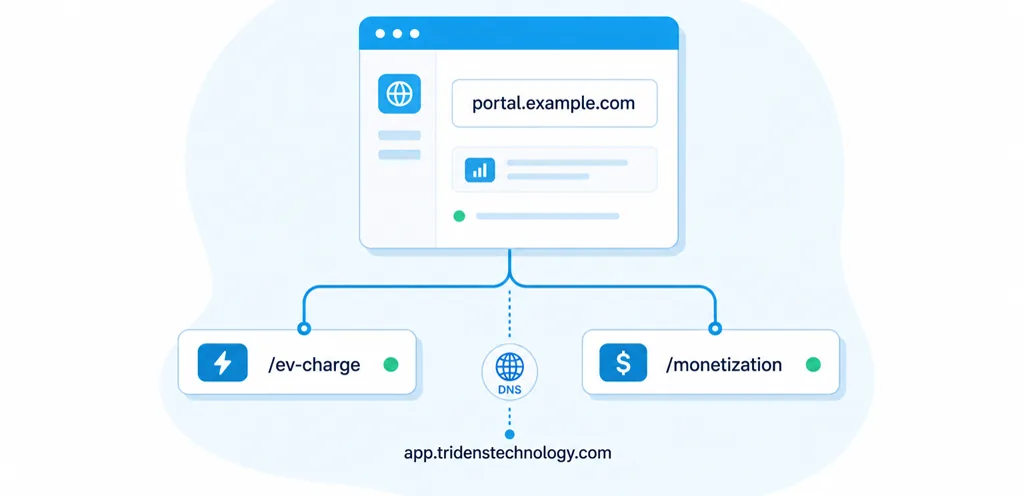
This guide is for customer admin and IT teams who want a white-label portal URL instead of sending users to a generic application domain. With a custom CNAME record, your customers can access their portals from a branded address such as https://portal.example.com/ev-charge o https://portal.example.com/monetization.
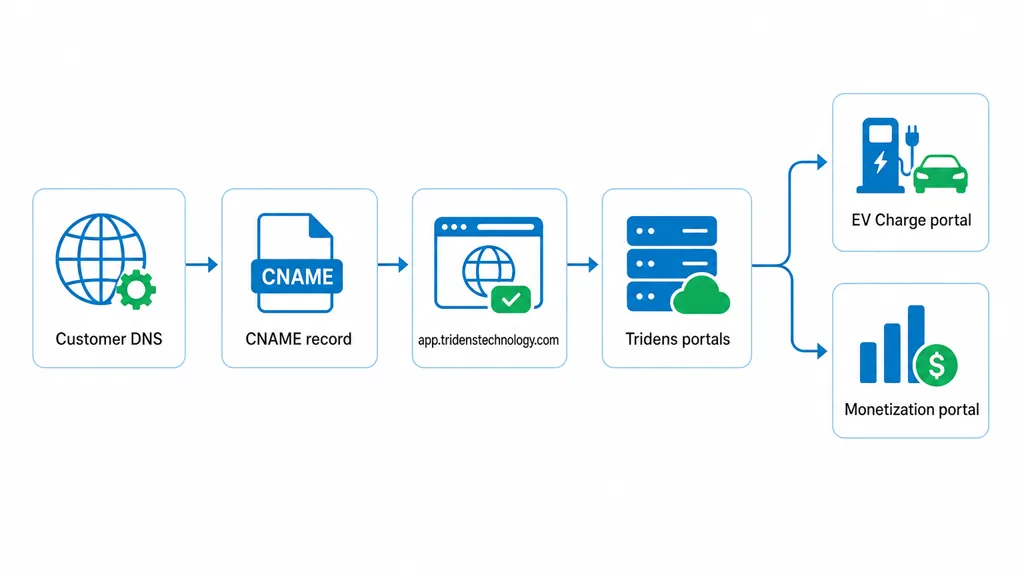
The DNS setup is simple, but the details matter. The CNAME target should point to app.tridenstechnology.com. Do not add https:// inside the DNS record. HTTPS is used when users open the final portal URL in their browser.
Visión general rápida
A white-label portal URL lets your customers use your own subdomain to reach the Tridens portal experience. The public URL stays on your brand, while Tridens handles the application behind it.
For example, if your company owns example.com, you can create the subdomain portal.example.com. After DNS is configured and the portal domain is activated, your customers can open the correct portal path:
https://portal.example.com/ev-chargefor the Tridens EV Charge portal.https://portal.example.com/monetizationfor the Tridens Monetization portal.
Lo que necesita antes de empezar
Before you change DNS records, make sure you have the right access and naming decisions ready. This avoids delays with DNS propagation, SSL activation, and portal testing.
- An active Tridens environment with the required portal enabled.
- Access to the DNS settings for your company domain.
- A chosen subdomain, such as
portal,my,accountoclientes. - Confirmation that the selected subdomain is not already used by another website or application.
- Permission from your internal IT, security, or domain administration team if DNS is managed centrally.
Use a subdomain instead of the root domain. For example, use portal.example.com, not example.com. This keeps your main website separate from the Tridens portal.
How the White-Label Portal URL Works
The white-label setup connects your domain to the Tridens application through DNS. Your customer enters your branded URL, the DNS record points the subdomain to Tridens, and Tridens routes the visitor to the correct portal path.
The same branded subdomain can be used for both portal paths when both are enabled for your account. This keeps the customer-facing URL clean and predictable.
| Portal | Example branded URL | Use case |
|---|---|---|
| Tridens EV Charge | https://portal.example.com/ev-charge | EV charging customers, drivers, fleet users, or portal users. |
| Tridens Monetization | https://portal.example.com/monetization | Billing, subscription, customer account, and revenue management portal users. |
If you use both Tridens EV Charge y Tridens Monetization, confirm which portal paths should be visible to your end users before sharing the branded link publicly.
Configure the CNAME Record
DNS providers use slightly different labels, but the record structure is usually the same. You need to create a CNAME record for your chosen subdomain and point it to the Tridens application host.
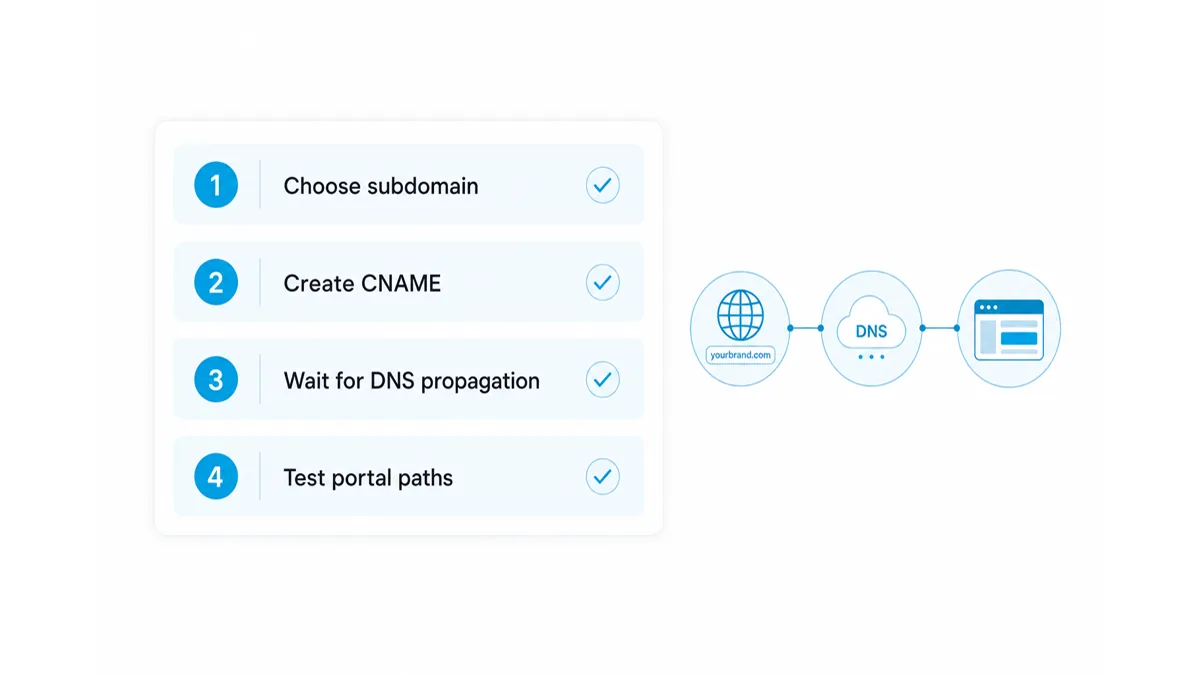
Step 1: Choose the subdomain
Pick a short name that customers will recognize. Common choices include portal, account, myo clientes. In this guide, we use portal.example.com.
Step 2: Open your DNS manager
Log in to the system where your domain DNS records are managed. This may be your domain registrar, hosting provider, Cloudflare account, Microsoft 365 DNS panel, or another managed DNS service.
Step 3: Add the CNAME record
Create a new CNAME record with these values:
| DNS field | Value | Notas |
|---|---|---|
| Tipo | CNAME | Use CNAME, not A or AAAA. |
| Name, host, or alias | portal | Use only the subdomain part. Some DNS providers may require the full value portal.example.com. |
| Target, value, or points to | app.tridenstechnology.com | Enter the hostname only. Do not include https://. |
| TTL | Default | Keep the default value unless your IT team requires something else. |
Save the record. DNS changes often appear within minutes, but propagation can take longer depending on the DNS provider and existing cache.
Step 4: Ask Tridens to activate the portal domain
After the CNAME record is saved, contact your Tridens project or support contact and share the branded portal domain you want to activate. Tridens will connect the domain to your environment and confirm when it is ready to test.
Do not publish the new portal link to customers until activation and testing are complete.
Test the Portal URLs
Once Tridens confirms the domain is active, test the portal as a customer would use it. Start in a private or incognito browser window so cached sessions do not hide configuration issues.
- Open
https://portal.example.com/ev-chargeif you use the EV Charge portal. - Open
https://portal.example.com/monetizationif you use the Monetization portal. - Confirm the page loads over HTTPS and the browser shows a secure connection.
- Check branding, navigation, login, and any customer-facing portal actions.
- Ask another user or internal tester to validate the link from a different network.
If you use analytics or tracking on the portal, confirm the expected events are recorded after the branded domain goes live.
Solución de problemas
Most setup issues come from DNS record conflicts, propagation delays, or entering the target value in the wrong format.
The portal does not load
Check that the CNAME record exists for the exact subdomain you want to use. Also confirm there is no A, AAAA, or another CNAME record using the same subdomain.
The DNS target was entered with HTTPS
DNS records do not use URL protocols. If the target is set as https://app.tridenstechnology.com, replace it with app.tridenstechnology.com.
The branded URL opens the wrong page
Confirm that users are opening the correct path after the domain. The EV Charge portal uses /ev-charge. The Monetization portal uses /monetization.
HTTPS is not ready yet
SSL activation may take time after the domain is connected. If HTTPS still fails after Tridens confirms activation, contact your Tridens support or project contact with the domain name and browser error.
Where To Use Your White-Label Portal URL
After the domain is active and tested, use the branded portal URL anywhere customers expect to manage their account, charging activity, invoices, or portal access.
- Website header and footer links.
- Customer onboarding emails.
- QR codes on printed material or charger instructions.
- Support documentation and help center articles.
- Account management and billing notifications.
Keep the link format consistent. If you use both portal paths, label them clearly so customers know which one to open.
White-label portal URL FAQ
What is a white-label portal URL?
A white-label portal URL is a branded web address that lets customers access a portal through your own domain or subdomain instead of a generic application domain.
What should the CNAME point to?
The CNAME target should point to app.tridenstechnology.com. Enter the hostname only, without https:// in the DNS record.
Can one subdomain open both Tridens portal paths?
Yes, when the portals are enabled and configured for your account, customers can use paths such as /ev-charge and /monetization under the same branded subdomain.
How long does DNS propagation take?
DNS changes often appear within minutes, but propagation can take longer depending on your DNS provider, TTL settings, and cached records.
Should I use the root domain or a subdomain?
Use a subdomain such as portal.example.com. This keeps your main website separate from the Tridens portal and avoids conflicts with existing DNS records.