

A complete guide for setting up the roaming communication between the Tridens EV Charge charging management system (CMS) and ENAPI roaming hub.
This guide details the partnership between Tridens and ENAPI, designed specifically for Charge Point Operators (CPOs) and eMobility Service Providers (EMSPs).
It provides a step-by-step framework for configuring the ENAPI roaming hub within the Tridens EV Charge platform.
CPO in roaming: Operators that manage the charging infrastructure in Tridens EV Charge and want to expose their chargers to a wider range of drivers that can see these chargers.
EMSP in roaming: Service providers using Tridens EV Charge with the mass of drivers (customers) that are interested in charging their electric vehicles. When provider joins the roaming, drivers get a wider network of chargers to use.
Quick Overview
ENAPI and Tridens EV Charge are different participants in the roaming network.
Tridens EV Charge contains isolated integration scopes for CPO (operator) and EMSP (provider), while ENAPI serves as a hub containing more other operators and providers.
Interoperability is achieved by using the Open Charge Point Interface (OCPI) communication protocol.

What You Need Before You Start
To establish integration as a CPO, you’ll need:
- An active Tridens EV Charge environment with chargers onboarded.
- Establish agreement with ENAPI to participate with mobility providers (EMSP) and their drivers.
- Registration token from ENAPI.
- Roaming configuration for ENAPI, set in Roaming.
- Pricing for roaming sessions, set in Roaming Tariffs.
To establish integration as EMSP, you’ll need:
- An active Tridens EV Charge environment with customers onboarded.
- Establish agreement with ENAPI to gain access to chargers of the participating charging operators (CPOs).
- Registration token from ENAPI.
- Roaming configuration for ENAPI, set in Roaming.
How Does ENAPI Communicate With Tridens EV Charge?
OCPI protocol is used for the communication between Tridens EV Charge and ENAPI hub.
Once the initial handshake and registration between the roaming platforms succeed, the platforms start exchanging relevant information about the locations, chargers, tariffs, sessions, charging records and commands to control the charging sessions. Set of exchangeable operations depends on the CPO or EMSP role.
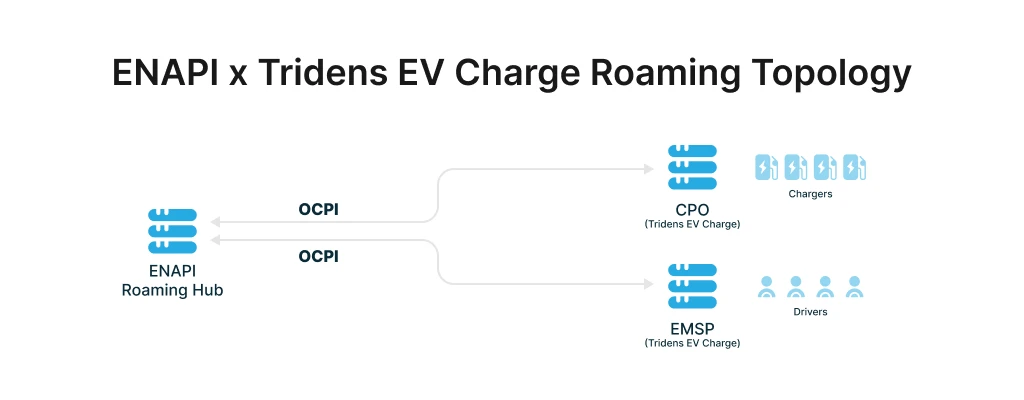
CPO publishes locations and charging infrastructure data, session updates, wholesale tariffs for charging expenses and charging records. Authorization of customer’s identity devices (RFID, NFC, etc.) at the charger are sent to the hub for verification at EMSPs. CPO also accepts the session control commands, covering the charging session start/stop from other actors in roaming.
EMSP, on the other hand, verifies their customer’s authorization requests from hub (comes from CPO), while also requesting the session control at CPOs through hub. Collects data about locations, charging infrastructure, sessions and charging expenses, to provide good charging experience to customers.
Configuring ENAPI with Tridens EV Charge
Let’s dive in for the steps required to set up the ENAPI communication in Tridens EV Charge.
Step 1: Handshake in ENAPI Portal
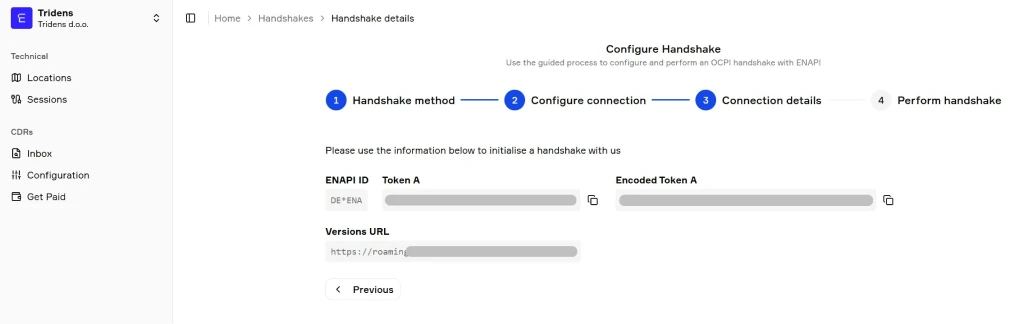
Once you gain access to ENAPI portal, you need to introduce a new connection with Tridens EV Charge. Inside the ENAPI portal navigate to Home – Settings – Roaming – Handshakes and click New Handshake.
The following handshake settings should apply:
- ENAPI provides versions and token.
- Use the latest suitable OCPI protocol (e.g., 2.3.0).
- Other settings are default (as suggested by ENAPI dialogue).
- At the last step, see the unencoded registration token as Token A and use it in further steps.
Step 2: Add OCPI Roaming Profile
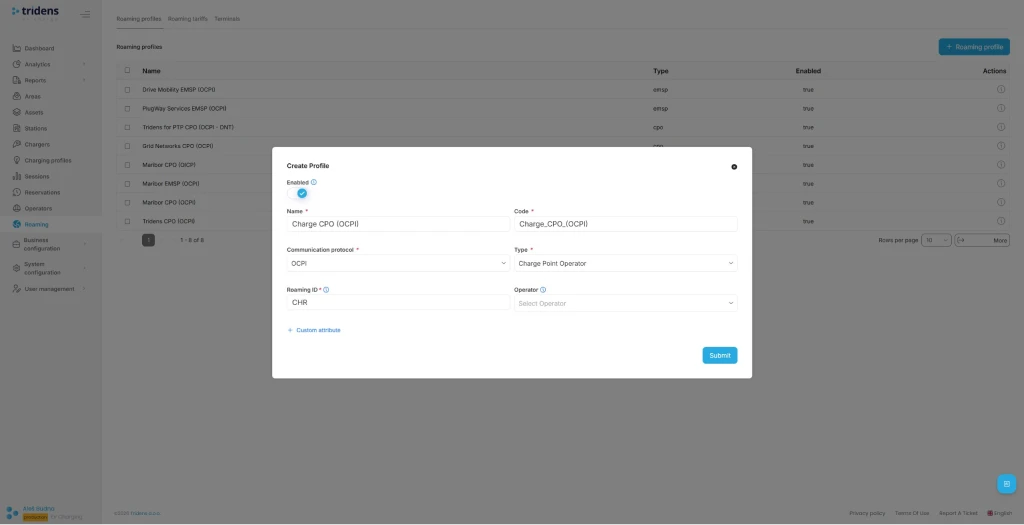
Move to Tridens EV Charge environment, open Roaming in the left menu and create or reuse a Roaming Profile which represents your role, whether it is CPO or EMSP for the OCPI protocol.
Set recognizable Name and Code of your business, select OCPI protocol, Role, and your three-letter Roaming ID which will represent you in the roaming network.
Find out more about Roaming Profiles.
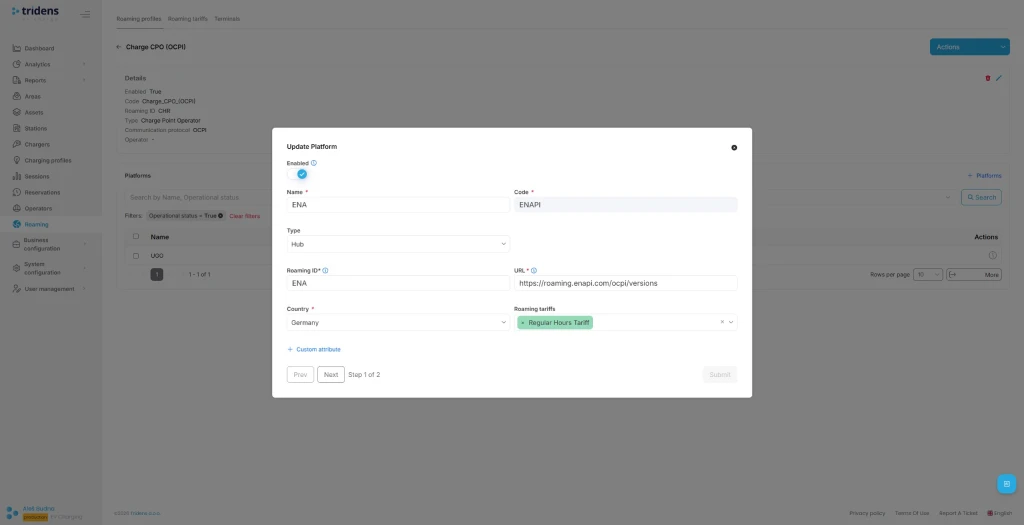
Step 3: Add ENAPI Roaming Platform
Next step in Tridens EV Charge is to go inside the Roaming Profile and add the Roaming Platform of ENAPI.
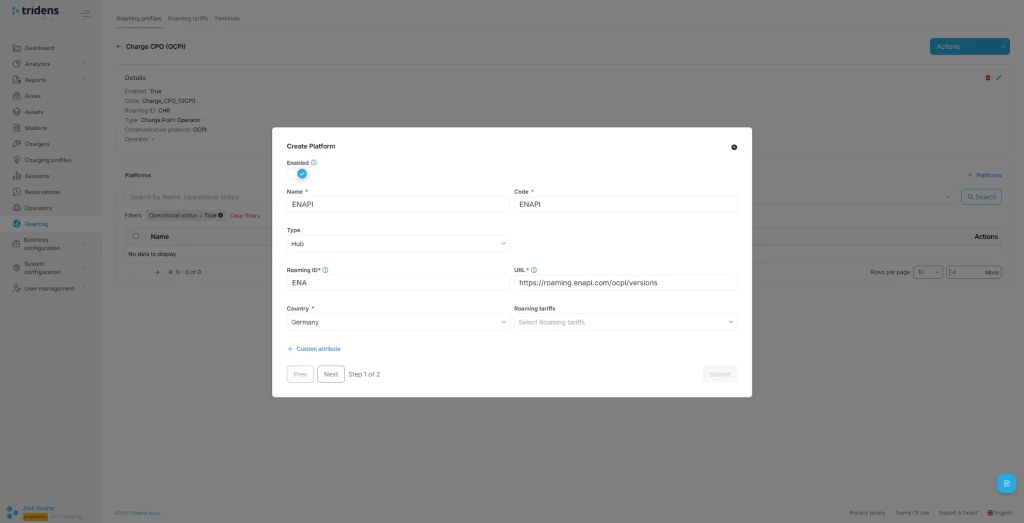
Fill in ENAPI platform’s recognizable Name with Code, select Hub Type, ENAPI’s Roaming ID, URL and operating Country.
ENAPI recommended settings:
- Name: ENAPI Hub
- Type: Hub
- URL: https://roaming.enapi.com/ocpi/versions
- Roaming id: ENA
- Country: Germany
If you’re a CPO, you can add Roaming Tariffs later for the wholesale expenses calculation of using the chargers.
Interested in more details? Check out Roaming Platforms documentation.
Step 4: Use the Registration Token
In the next step of Roaming Platform configuration, registration dialogue shows up. Insert the token provided from the ENAPI and Submit the form.
On the Roaming Platforms overview, select the recently created platform and hit Register Credentials action.
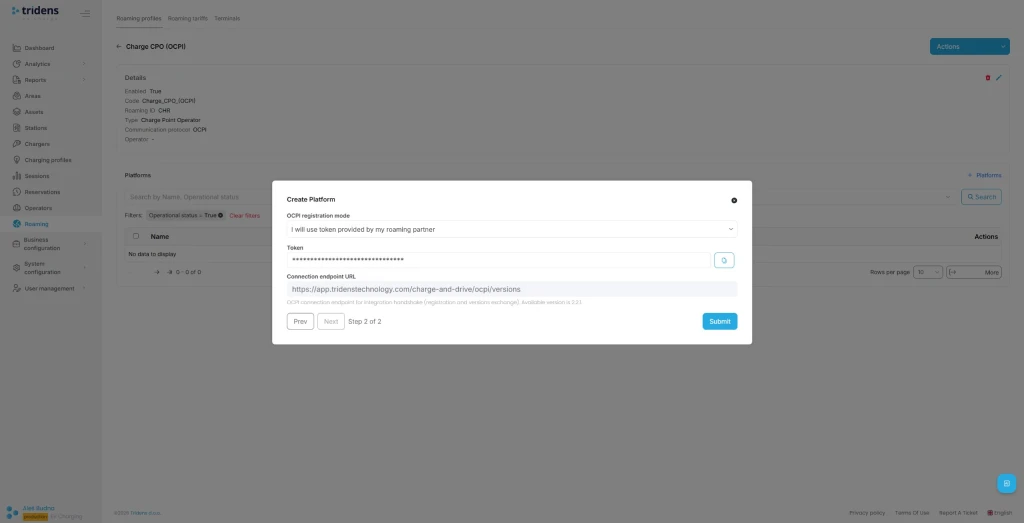
You can later Update credentials to renegotiate or Invalidate credentials to stop the communication.
It is also possible to register credentials in the opposite direction, where the new token is generated by Tridens EV Charge at the platform configuration dialogue.
If such principle is used, you need to take this token from Tridens EV Charge into ENAPI portal’s Handshake page and select using the alternative principle where ENAPI initiates the handshake.
Step 5: Expose Charging Infrastructure (CPO)
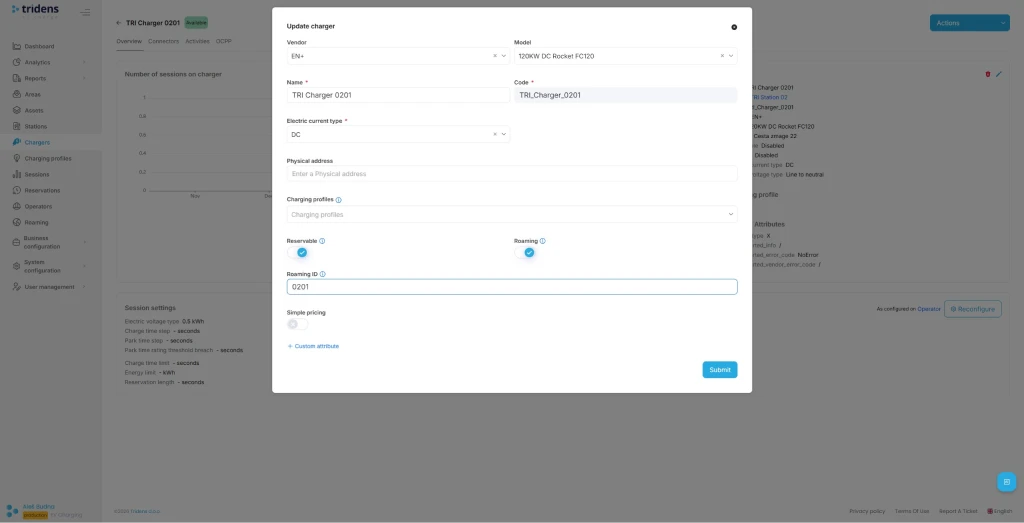
If you’re a CPO, you want to expose your locations and charging infrastructure to the roaming network. To achieve this, add unique Roaming ID for Area, Charger and Connector and enable roaming on chargers. You can expose all your locations and chargers in roaming or just cherry-pick a few, decision is yours.
Navigate to Areas in the left side menu and then select end edit the desired Area with roaming settings. From the Area, you can navigate downstream to the Station, Charger and Connector, so roaming settings can be assigned on the latter two.
More details on applying the roaming settings on your charging infrastructure in Tridens EV Charge is described at Areas and Roaming Profiles.
Step 6: Define Expense Tariffs (CPO)
If you’re a CPO, you want to define the roaming expense tariffs as the wholesale price for calculating the costs to EMSP providers about using your chargers. Tariffs are schedule-based, with recurrency and one-time options. Expenses can be configured for energy, charging time, parking time, reservation time, reservation flat and general flat fee, including VAT control and the upper amount limitation.
Go to Roaming in the left side menu and select Tariffs, where you can add new tariff definition first and then apply tariff details, covering different time ranges with cost rules.
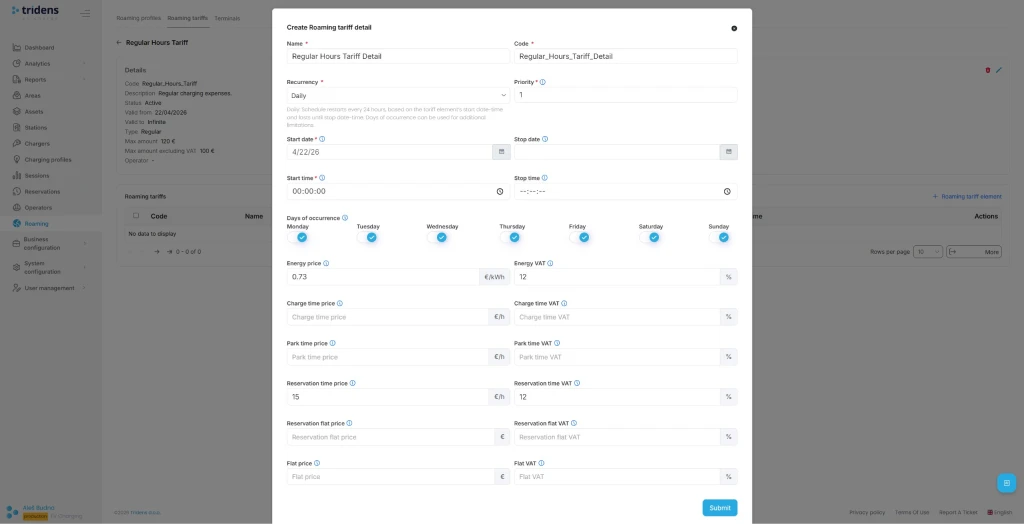
Roaming tariffs then need to be assigned on the Roaming Platform and belonging charging infrastructure scope as described in Roaming Tariffs.
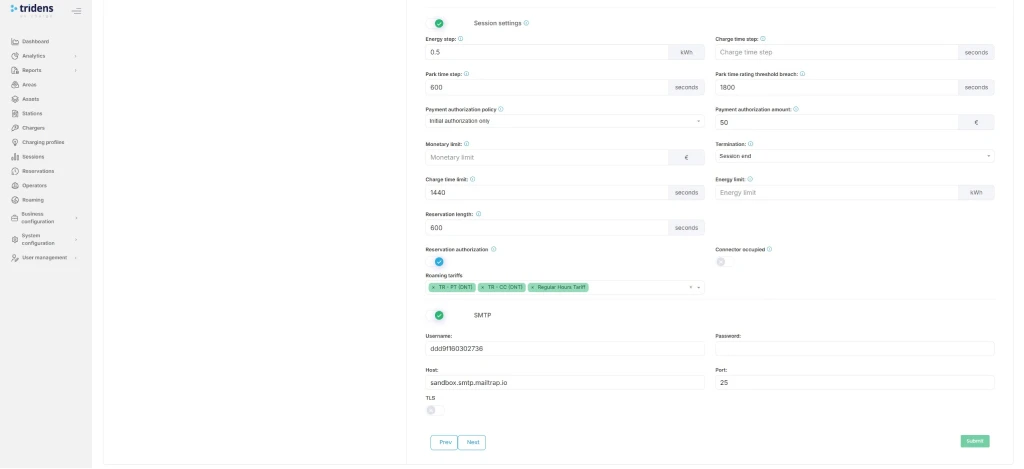
Step 7: Charger & Session Settings (CPO)
As the CPO, you want to ensure that charging infrastructure events, including session events are properly exchanged. Thus, the charger configuration in Tridens EV Charge must meet a few important considerations, so events are reported on regular intervals with sufficient data (power and energy kWh progression) and cover border cases when charger is not responsive enough. This will contribute to external users having better experience of charging.
Feel free to get through the blog How to Use Tridens EV Charge: From Onboarding to Testing the Charger.
We advise you to follow the guidelines defined in Charging Session Integration and if facing an issue, it is likely you will find the solution for yours in the Charging Session Malfunctions page, where common cases are described with solutions and preventive measures.
Test the Full Flow
Once the communication between with ENAPI is establishing by the registration handshake, you can proceed to the test flow which differs based on your CPO or EMSP role in Tridens EV Charge.
Test flow for CPO role consists of:
- Verify that each Area with Chargers and Connectors that you want to expose for roaming is visible in the ENAPI portal’s Locations view.
- Further review data compliance by opening-up the details of the Location structure where data must be up to date. Each change in the charging infrastructure of Tridens EV Charge should be visible in ENAPI near-real time.
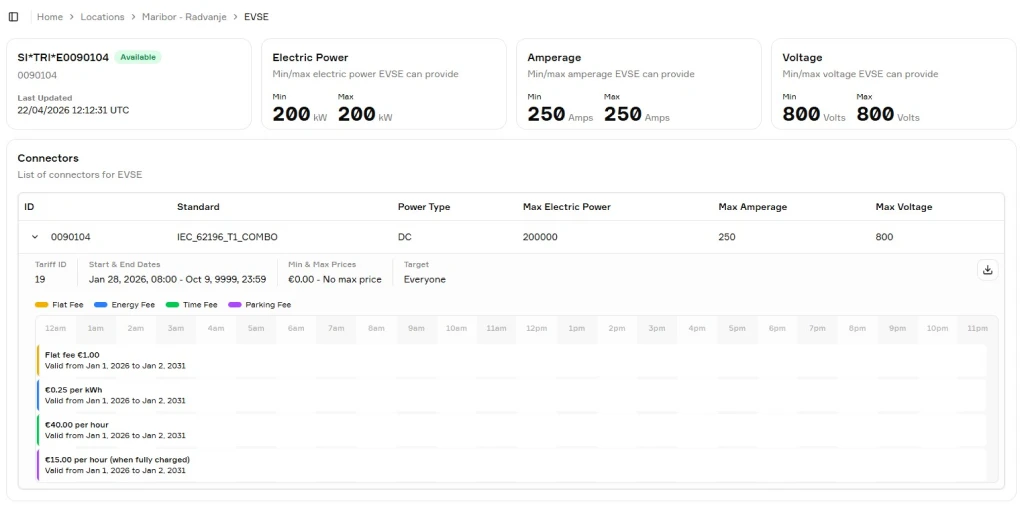
- Confirm that tariffs are assigned in Locations – EVSE – Connectors on ENAPI portal.
- When one of your chargers is available for charging, navigate to its Location and under the list of EVSE (also Electric Supply Equipment) select an action of Start a charge. You can select one of predefined tokens in Remote start mode and hit the Start charging button. This is expected to trigger the new session to start on your physical charger, if vehicle is properly connected.
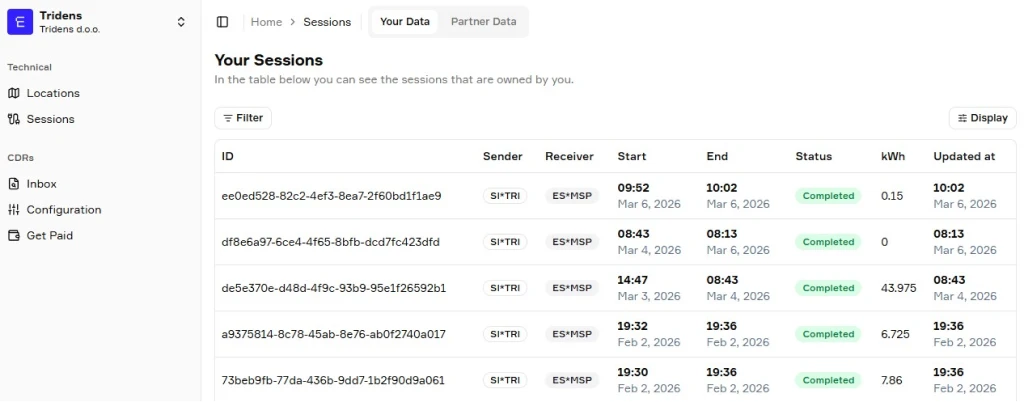
- Monitor the progress of the charging session in ENAPI and Tridens EV Charge. Verify that details such as start time, duration, energy (kWh), parking time are suitable. Verify intermediate values of a progressing session. You can find the progressing sessions in the Session section of both portals.
- Once the session is completed, verify the list of completed sessions and ensure that start/stop times, duration, energy, parking time and total cost are as expected in both ENAPI and Tridens EV Charge portals, under Sessions view. Tridens marks such sessions with Roaming customer mode.
- Confirm that wholesale expenses (total cost) in ENAPI matches to the roaming tariffs defined in Tridens.
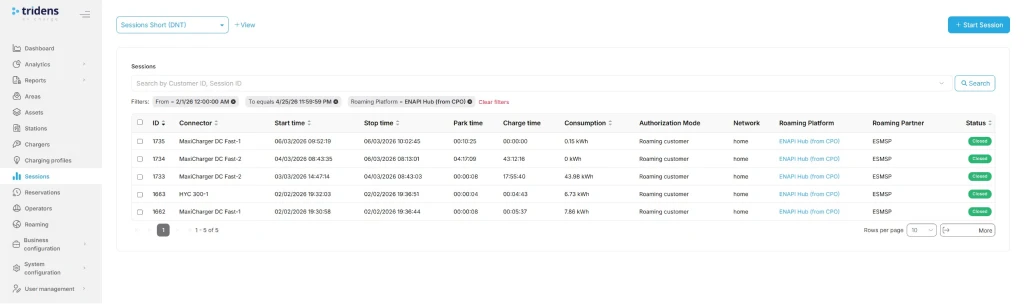
Test flow for EMSP role consists of:
- Use Tridens EV Charge mobile interface with customer account to see the third-party chargers exposed on map by ENAPI partners.
- When there is a charger available for charging with vehicle ready, hit Start session. The request is expected to trigger the session start on the selected charger.
- Monitor Sessions sections of ENAPI and Tridens EV Charge portals and mobile app to see the session progressing and compare the compliance of start time, duration, energy (kWh) and parking time.
- Once the session terminates at the charger side, both portals should show the summary of the session in near time. Compare the compliance of start/stop times, duration, energy, parking time and total cost. Note that the total cost of EMSP session in Tridens EV Charge is a retail cost, based on Tridens Monetization catalogue, meanwhile wholesale costs are reported by ENAPI.
Troubleshooting
| Occurence | Reasons | Solution |
|---|---|---|
| Locations and chargers data not in-sync | Credentials malfunction | Repeat the registration and handshake process described in Step 1 and Step 4. |
| Network connectivity issue | Ensure both platforms are communicating. Check out the status pages. Contact the platform operators, if necessary. Tridens Status Page | |
| Roaming disabled | Ensure roaming settings are still enabled in Tridens EV Charge environment: Roaming Profile, Roaming Platform and roaming settings of Area, Charger and Connector. | |
| Tariffs do not appear in ENAPI | Roaming Tariff configuration | Ensure that Roaming Tariff is properly configured in Tridens EV Charge with valid date-time scopes and cost. Tariff must then be applied to the Roaming Platform and charging infrastructure scope. Roaming Tariffs |
| Costs not calculated on session | ||
| Session progress issues if you are the CPO | Charger operations or system settings | Check out the Charging Session Malfunctions with list of the most common issues and resolutions with preventive measures. Also advised to verify the Charging Session Integration guide. |
| Session progress issues if you are the EMSP | Charger operations or system setting at CPO | You can request the session stop and try another session. If the issue keeps occurring, it is advised to report an issue to the CPO. |
FAQs about ENAPI Configuration in Tridens EV Charge
Make agreement with ENAPI, then go into Tridens EV Charge and configure the Roaming Profile and Roaming Platform, exchange the registration token and register credentials.
Yes, you can control which exact areas and chargers to expose in roaming by assigning or not assigning the roaming settings on them.
You make an agreement with ENAPI in a matter of days, then proceed with setup in your Tridens EV Charge environment, by following the steps in this article to make a connection, which should not take more than an hour. Then you need to assign roaming identifiers on areas and chargers, including tariffs, so this will take additional time, depending on how many areas, chargers, and different tariffs you want to expose.
ENAPI communicates with CPOs and EMSPs by OCPI protocol. ENAPI then manages the participation between the CPOs and EMSPs.
Tridens and ENAPI communication by OCPI goes with HTTPS calls, where each side verifies the other to have a trusted certificate that ensures encrypted communication. Another level of security is applied by using the access tokens in each request. Access token is negotiated at the initial registration and is being verified at each further message exchange between the sides.
Version of OCPI protocol used between the roaming platforms can be renegotiated to the latest mutual by first invalidating the credentials of the Roaming Platform, then assigning the new registration token (Token A) and triggering the registration process.