Custom Payment Integration
Category:
Topics in this document:
- Third-party payment processing in Monetization
- Asynchronous payment processing
- Synchronous payment processing
Third-party payment processing in Monetization
Third-party payment processing is achievable through two methods, synchronous and asynchronous. The synchronous method requires immediate responses from your payment integration component, while the asynchronous method combines extracting invoices from Monetization, then importing the payments at a later time.
Information:
Typically, your use case determines which processing method is optimal.Asynchronous payment processing
For asynchronous payment processing, you export invoices from Monetization, and payments are processed outside of Monetization entirely. When you have payment processing results, you import them via CSV files or the Monetization API.
Exporting invoices
You can export invoices from Monetization by configuring an invoice export mapper and scheduling an exporting job, which will export the files to an SFTP location, or by subscribing to an invoice creation via Webhook, which will trigger an invoice request to the provided URL address whenever a new invoice is created.
Exporting job – CSV file to SFTP
To export invoices as CSV files, an Invoice Export mapper needs to be configured to map invoice parameters to CSV file columns. Monetization User Interface allows such configuration under Business configuration Export Invoice mappers.
 Figure 1: Example of invoice export mapper configuration
Invoice exports are scheduled through Exporting Jobs, which can be one-off tasks or automated to run for specific periods. The Exporting Job will save the exported CSV file to the respective SFTP location storage/invoice/folder_name/file_name.csv.
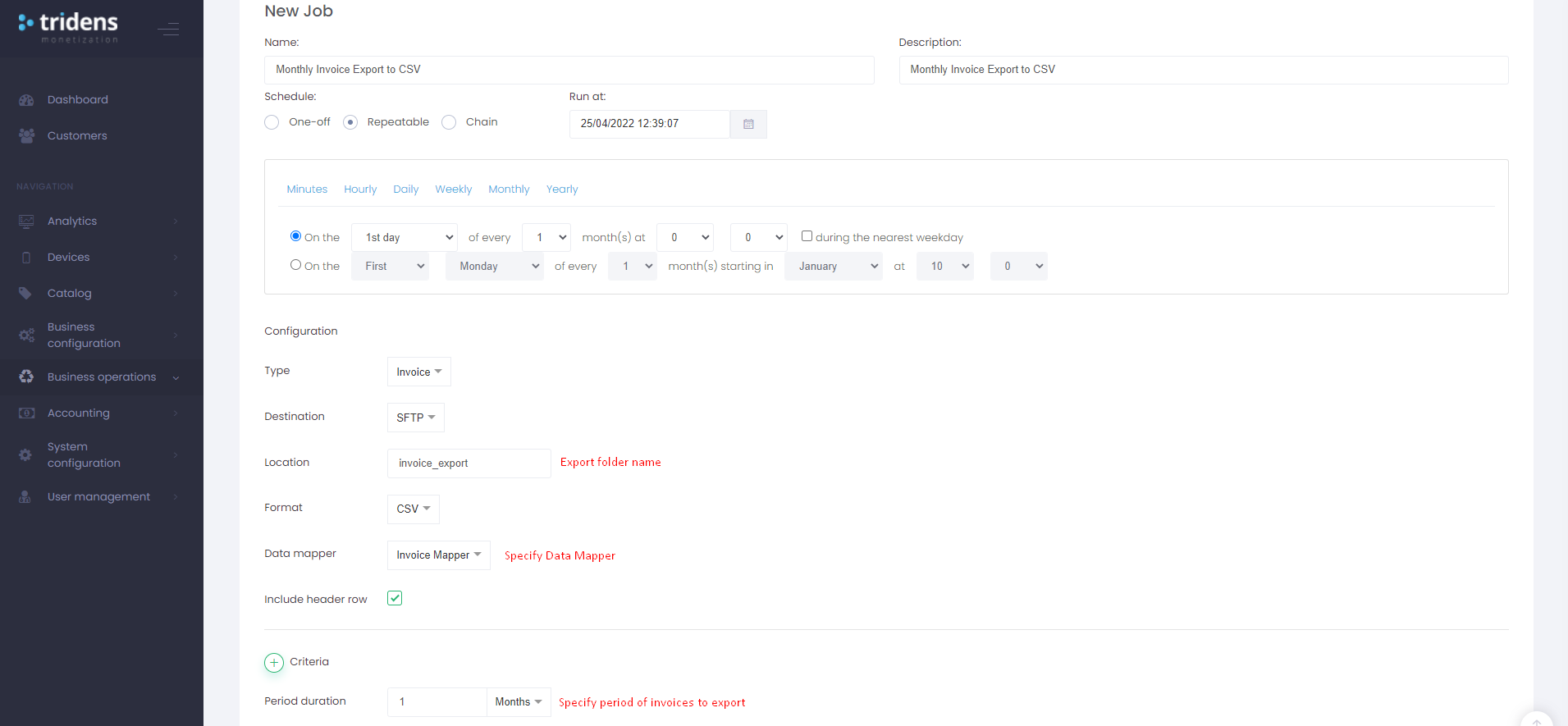 Figure 2: Example of invoice export job
Notification - webhook method
Exporting invoices through webhooks allows you to receive invoices immediately upon creation. This is achieved by configuring an Invoice Notification Rule, which will send every created invoice as a JSON body request to the provided URL address, along with any pre-configured header options.
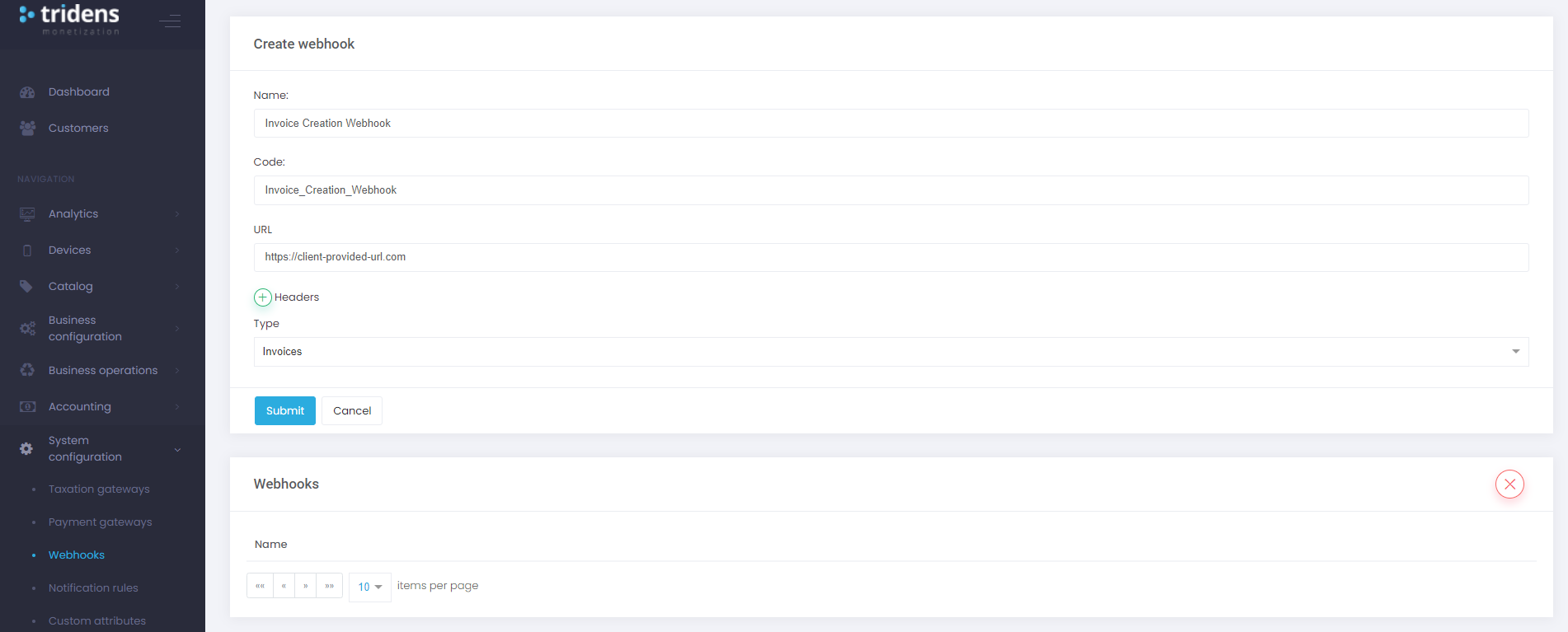 Figure 3: Example of invoice creation webhook configuration
Importing payments
You can import payment transactions to Monetization by configuring a payment import mapper and uploading the payment CSV files to the SFTP input location or by utilizing Monetizations REST API.
CSV file import via SFTP
For Monetization to import payment transactions via CSV files, there has to be a Payment Import Mapper configured. The configuration is possible through the Monetization User Interface under Business configuration Import Payment mappers.
The Payment mapper allows for the mapping of CSV columns to payment transaction parameters and the definition of a file prefix, which needs to be present in the uploaded files.
Files are uploaded on the SFTP server in folder edl/input and will be moved to edl/processed, edl/successful, edl/error, and edl/rejected folder depending on processing results.
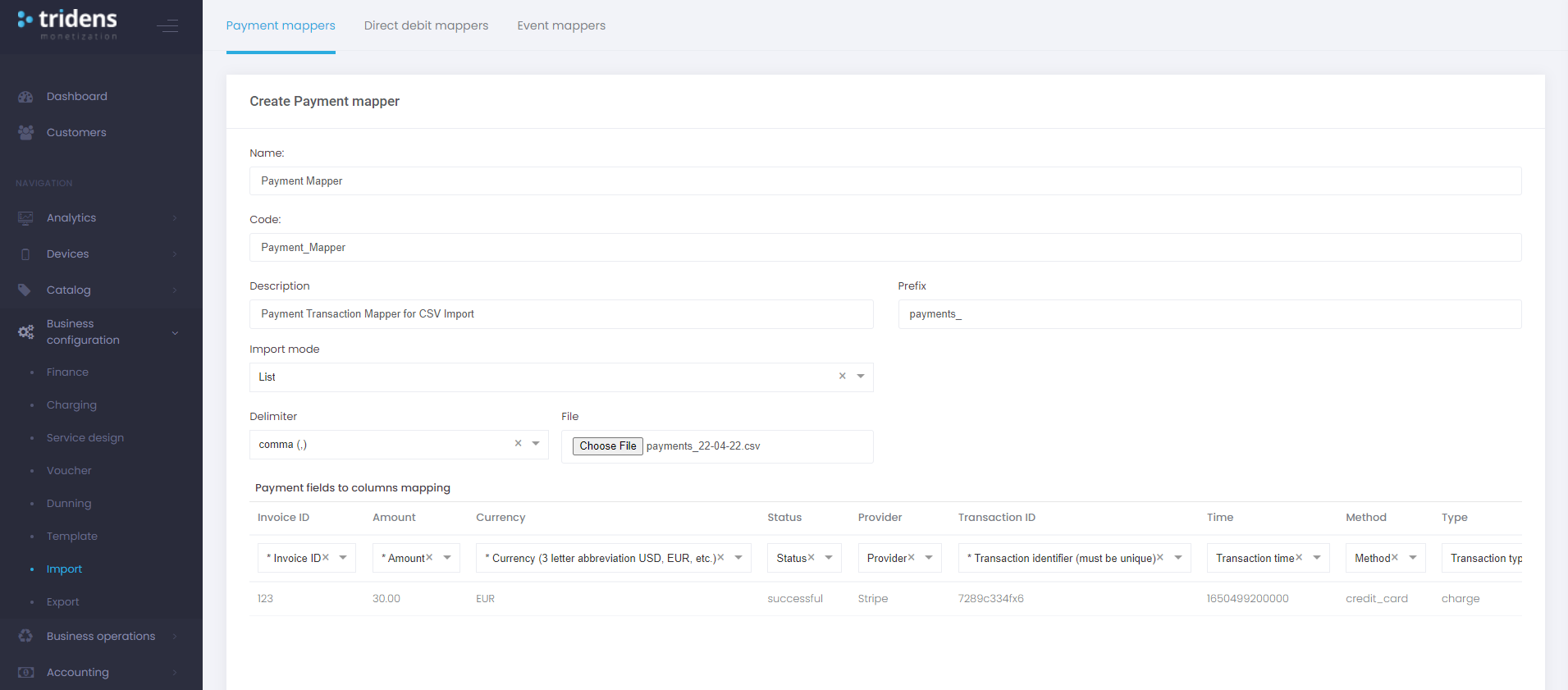 Figure 4: Example of payment import mapper configuration
Import via API call
To import a payment transaction via the Monetization API, post a JSON request containing transaction details to the Monetization REST API.
Note:
A user must first be authenticated to communicate with the Monetization API.Authentication
Monetization API uses Bearer Token authentication:
- Execute the Authentication request with username, password, and specific site code.
- Harvest the
tokenfrom the response. - Set the
Authorizationheader toBearer <token>in the upcoming requests. - The token expires after 5 minutes.
URL: {{api_url}}/authenticate

Headers
Content-Type:application/json

Body
{
    "username": "your_monetization_username",
    "password": "password",
    "site_code": "your_monetization_site_code - subdomain"
}
Payment import request
URL: {{api_url}}/api/v1/import

Headers
Content-Type:application/json
Authorization:Bearer {{auth_token}}
Data-Type:Payment

Body
{
    "invoice_id": 123,
    "transaction_identifier": "T-1233-cew3-445f-feew3",
    "amount": 150,
    "transaction_time": 1600613169000,
    "currency": "EUR",
    "method": "other",
    "type": "charge",
    "provider": "stripe"
}
Synchronous payment processing
Synchronous payment processing requires synchronous communication between Monetization and your payment integration component. This processing method enables credit/debit card authorizations and immediate payments.
You configure Monetization to specify where the payment processing related requests should be sent, and Monetization has predefined responses which it expects in return. This processing method enables the storage of payment method references on the customers and supports automated payment collection processes.
For Monetization, the integration process is virtually the same as an out-of-the-box integration with an existing provider (Stripe, Braintree, etc.). However, the communication is executed through a component developed by you, which acts as a gateway to your local payment provider.
Essential operations to support Synchronous payment processing:
- Setup Intent
- Authorize
- Capture
- Charge
Third-party payment provider setup
To set up a third-party payment provider integration, configure a third-party payment gateway profile and provide the URL where Monetization should send requests.
This is achievable over the UI under System configuration Payment gateways, or by creating a Payment Gateway Profile via the Monetization REST API.
URL: {{api_url}}/api/v1/payment-gateway-profiles

Headers
Content-Type:application/json
Authorization:Bearer {{auth_token}}

Request
{
    "provider": "third-party",
    "headers": {
        "PGW_URL": "URL to your payment gateway"
    }
}
Customer operations
Customer operations only apply in cases where the third-party payment provider supports customer management. If the payment provider does not support customer management, then the customer ids can be replaced with any value (e.g., Unix timestamp of request).
Create customer (without card)
Creates a customer as an object on the payment provider service.
Request sent by Monetization:
{
    "action": "create_customer",
    "content": {
        "customer": {
            "first_name": "John",
            "last_name": "Anderson",
            "company": "Company",
            "email": "john_anderson@testmail123.com",
            "phone": "003861234335",
            "tax_identifier": "123543569596"
        },
        "billing_address": {
            "first_name": "John",
            "last_name": "Anderson",
            "company": "Company",
            "street_address": "Address street 12",
            "locality": "Name of City",
            "postal_code": "84116",
            "region": "Region",
            "country_code": "SI",
            "country_name": "Slovenia "
        }
    }
}
Expected response:
HTTP Status: 201 Created
{
    "customer": {
        "id": "payment_provider_customer_id"
    }
}
Update customer
Updates a customer object on the payment provider service.
Request sent by Monetization:
{
    "action": "update_customer",
    "content": {
        "customer": {
            "id": "payment_provider_customer_id_1",
            "first_name": "John",
            "last_name": "Anderson",
            "company": "Company",
            "email": "john_anderson@testmail123.com",
            "phone": "003861234335",
            "tax_identifier": "123543569596"
        },
        "billing_address": {
            "first_name": "John",
            "last_name": "Anderson",
            "company": "Company",
            "street_address": "Address street 12",
            "locality": "Name of City",
            "postal_code": "84116",
            "region": "Region",
            "country_code": "SI",
            "country_name": "Slovenia "
        }
    }
}
Expected response:
HTTP Status: 204 No Content
No Response Body
Read customer
Reads a customer object from the payment provider service.
{
    "action": "read_customer",
    "content": {
        "id": "payment_provider_customer_id_1"
    }
}
Expected response:
HTPP Status: 200 OK
{
    "content": {
        "customer": {
            "id": "payment_provider_customer_id_1",
            "first_name": "John",
            "last_name": "Anderson",
            "company": "Company",
            "email": "john_anderson@testmail123.com",
            "phone": "003861234335",
            "tax_identifier": "123543569596"
        },
        "billing_address": {
            "first_name": "John",
            "last_name": "Anderson",
            "company": "Company",
            "street_address": "Address street 12",
            "locality": "Name of City",
            "postal_code": "84116",
            "region": "Region",
            "country_code": "SI",
            "country_name": "Slovenia "
        },
        "credit_cards": [
            {
                "is_default": true,
                "card_holder_name": "John Anderson",
                "expiration_month": "03",
                "expiration_year": "2026",
                "type": "Mastercard",
                "token": "payment_provider_card_token",
                "last_four": "1234"
            }
        ]
    }
}
Delete customer
Deletes a customer object from the payment provider service.
Request sent by Monetization:
{
    "action": "delete_customer",
    "content": {
        "id": "payment_provider_customer_id_1"
    }
}
Expected response:
HTTP Status: 204 No Content
No Response Body
Card operations
Card operations refer to setting up or removing credit and debit cards.
Setup (setup card request)
Triggers a process where a customer can provide credit card details, which are tokenized and stored in Monetization. Upon a request to add a new credit card, Monetization will send a setup request to your integration component.
Your integration component needs to handle any logic related to the payment provider services and return a redirect URL to Monetization as a response. The customer will then be redirected to the provided URL, where your payment provider hosted form will collect and tokenize the customer’s card details.
 Figure 5: Credit card setup
Request sent by Monetization:
{
    "action": "setup",
    "content": {
        "customer": {
            "id": "payment_provider_customer_id_1",
            "first_name": "John",
            "last_name": "Anderson",
            "company": "Company",
            "email": "john_anderson@testmail123.com",
            "phone": "003861234335",
            "tax_identifier": "123543569596"
        },
        "billing_address": {
            "first_name": "John",
            "last_name": "Anderson",
            "company": "Company",
            "street_address": "Address street 12",
            "locality": "Name of City",
            "postal_code": "84116",
            "region": "Region",
            "country_code": "SI",
            "country_name": "Slovenia "
        }
        "custom_attributes": {
            "callback_url": "https://callbackurl.com"
        }
    }
}
Expected response:
HTTP Status: 201 Created
{
    "customer": {
        "id": "payment_provider_customer_id"
    },
    "redirect_url": "https://card-data-collection-form.com"
}
Delete card
Sends a request to your integration component to handle credit card reference removal logic via the payment provider services, then removes the reference from Monetization upon success.
Request sent by Monetization:
{
    "action": "delete_credit_card",
    "content": {
        "customer": {
            "id": "provider_customer_id_34"
        },
        "credit_card": {
            "token": "provider_card_token_x23423532"
        }
    }
}
Expected response:
HTTP Status: 204 No Content
No Response Body
Transaction operations
Transaction operations refer to transactional actions executed on stored payment method (credit/debit card) tokens. These actions include:
Authorization
Authorization is used to authorize (lock) funds on a customer’s payment method. Authorizations can later be Captured or Voided. The request below is sent to your integration component, which should handle payment provider service logic and return a response.
Request sent by Monetization:
{
    "action": "authorize",
    "content": {
        "amount": 20.5,
        "currency": "EUR",
        "customer": {
            "id": "provider_customer_id_34"
        },
        "credit_card": {
            "token": "provider_card_token_x23423532"
        }
    }
}
Expected response:
HTTP Status: 202 Accepted
{
    "transaction_id": "payment_provider_transaction_id",
    "amount": 25.5,
    "currency": "EUR",
    "time": "1650629967000",
    "success": true,
    "message": "Message from provider if given",
    "code": "Code from provider if given"
}
Capture
Capture refers to the collection of authorized funds from a previous Authorization request. The amount to collect can be equal to or lower than the authorized amount.
Any uncollected authorized funds will be released back to the customer by the payment provider service. The below request is sent to your integration component, which should handle payment provider service logic and return a response.
Request sent by Monetization:
{
    "action": "capture",
    "content": {
        "transaction_id": "provider_transaction_id_t2134234",
        "amount": 10.5
    }
}
Expected response:
HTTP Status: 202 Accepted
{
    "transaction_id": "payment_provider_transaction_id",
    "amount": 10.5,
    "currency": "EUR",
    "time": "1650629967000",
    "success": true,
    "message": "Message from provider if given",
    "code": "Code from provider if given"
}
Charge
Charge authorizes and captures funds as a single immediate transaction. The below request is sent to your integration component, which should handle payment provider service logic and return a response.
Request sent by Monetization:
{
    "action": "charge",
    "content": {
        "amount": 25.5,
        "currency": "EUR",
        "customer": {
            "id": "provider_customer_id_34"
        },
        "credit_card": {
            "token": "provider_card_token_x23423532"
        }
    }
}
Expected response:
HTTP Status: 202 Accepted
{
    "transaction_id": "payment_provider_transaction_id",
    "amount": 25.5,
    "currency": "EUR",
    "time": "1650629967000",
    "success": true,
    "message": "Message from provider if given",
    "code": "Code from provider if given"
}
Void
Void operation voids an Authorization transaction, releasing the authorized funds. The below request is sent to your integration component, which should handle payment provider service logic and return a response.
Request sent by Monetization:
{
    "action": "void",
    "content": {
        "transaction_id": "provider_transaction_id_t2134234"
    }
}
Expected response:
HTTP Status: 202 Accepted
{
    "transaction_id": "payment_provider_transaction_id",
    "time": "1650629967000",
    "success": true,
    "message": "Message from provider if given",
    "code": "Code from provider if given"
}
Refund
Refund returns funds to the customer and references a previous Charge or Capture transaction. The below request is sent to your integration component, which should handle payment provider service logic and return a response.
Request sent by Monetization:
{
    "action": "refund",
    "content": {
        "transaction_id": "provider_transaction_id_t2134234",
        "amount": 10.5
    }
}
Expected response:
HTTP Status: 202 Accepted
{
    "transaction_id": "payment_provider_transaction_id",
    "amount": 25.5,
    "currency": "EUR",
    "time": "1650629967000",
    "success": true,
    "message": "Message from provider if given",
    "code": "Code from provider if given"
}
Error handling
In case an operation is not successful on your integration component, return any status outside of 200-300 range and the error message in the response body.


