Payment Terminal Integrations
Category:
Topics in this document:
Introduction
This document describes the setup requirements for the payment terminal (POS) integration by OCPI or OICP communication protocols on Tridens EV Charge.
Integration involves Payment Terminal Providers (PTP) communicating with the charging infrastructure of charge point operators (CPO).
In this document, the term payment terminal provider is used as a technical term and is considered a synonym for the less technical term POS provider.
The Payment Terminal Provider acts as a gateway to the charging infrastructure via OCPI or OICP protocols for charging session control and related data transfer.
OCPI protocol offers official payment terminals support. For OICP, a hybrid concept can be utilized.
Notes:
Payment terminal providers can be added to Tridens EV Charge environment.
Payment terminal provider’s charging sessions are stored in Tridens EV Charge as part of an away charging infrastructure network, without a known customer/driver reference.
When the payment terminal provider charging session is utilized on a related CPO’s charging infrastructure that is part of Tridens EV Charge, such sessions appear as part of the home charging infrastructure network for that CPO.
Sessions are part of reporting in Tridens EV Charge for CPOs.
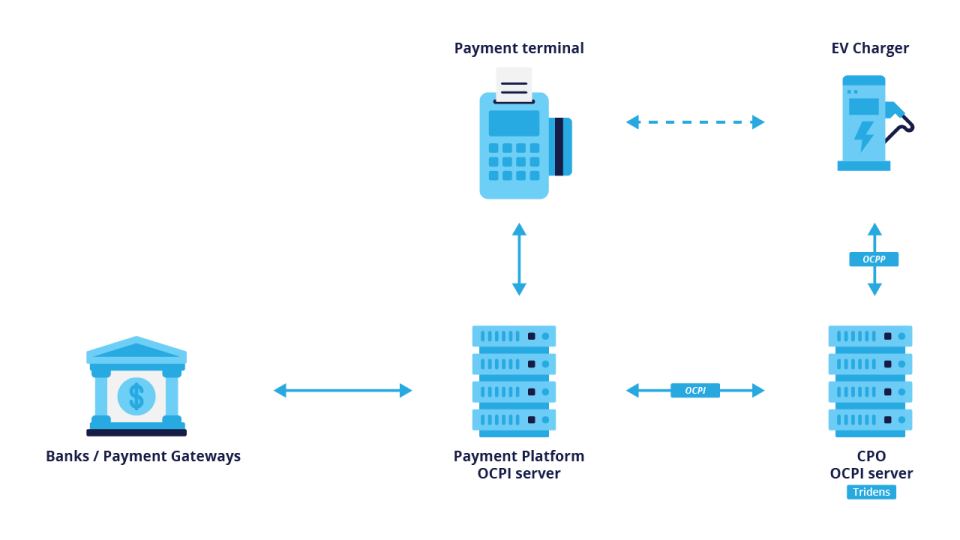
Figure 1: OCPI communication topology for payment terminal providers.
Configuration
Payment terminal providers can be configured in Tridens EV Charge tenant environments for CPOs. The following instructions focus on the OCPI protocol, as it officially defines payment terminal setup and communication (standardized since OCPI 2.2.1).
Configure Payment Terminal Provider
To configure the environment for a roaming Payment Terminal Provider (PTP):
Navigate to Roaming:
- Go to the Roaming section on the left-side menu of the Tridens EV Charge dashboard.
- Roaming Profile in this case represents environment as the operator of the charging infrastructure (chargers) in the roaming network.
- Roaming Platform here represents the third-party payment terminal provider.
- Submit configuration.
Create Roaming Profile (CPO):
- On the Roaming Profiles tab, create a new profile or use an existing one.
- Name & Code: Assign a name and code to identify the roaming profile.
- Type: Select CPO (charge point operator).
- Protocol: Select OCPI.
- Roaming ID: Three-uppercase-letter identifier that will represent CPO in roaming.
- Submit configuration.
Create Roaming Platform (PTP):
- Create a new Roaming Platform:
- Name & Code: Assign values to identify the platform.
- Type: Select Payment Terminal Provider (PTP).
- URL: Enter the payment terminal provider’s back-office server URL (e.g.,
https://your-pos-provider.com/api/ocpi). - Country: Select the origin country of the payment terminal provider.
- Connection Initiation: Select which side will initiate the OCPI connection using the registration token.
- Credentials Exchange (Token):
- If PTP provides the token: Select “I will use token provided by my roaming partner” and enter the token in the field.
- If CPO provides the token: Select “I will provide token to my roaming partner” and click Generate. Share the generated token and your connection URL with the payment terminal provider.
Registration:
- Communication must be initiated via registration.
- Register credentials
- If you used the partner’s token, click “Register credentials” on the selected Roaming Platform.
- If you provided the token, the payment terminal provider must initiate the registration.
- Update Credentials: Use “Update credentials” to renegotiate credentials if needed.
- Invalidate Credentials: Use “Invalidate credentials” to stop communication/integration.

Figure 2: OCPI communication sequence.
Charging Infrastructure Setup
Once the CPO and PTP are communicating, the payment terminal provider can fetch the CPO’s charging infrastructure (Locations, EVSEs, Connectors). The CPO must populate specific roaming attributes to expose the infrastructure:
- Area: Populate the
roaming idwith a unique identifier and thephone number. - Charger: Populate the
roaming idwith a unique identifier and mark theroamingattribute as enabled. - Connector: Populate the
roaming idwith a unique identifier.
Locations and charging infrastructure are reported to the payment terminal provider (push mode) and can also be fetched (pull mode).
Roaming Tariffs
As the charge point operator, you might want to assign roaming tariffs to represent prices for sessions initiated by payment terminal providers (PTP). Set up the Roaming Tariff for ad-hoc payments with the desired prices for energy and time, including taxes. Tariff also contains the max. amount for payment authorization of the charging session.
Important Notes:
- Roaming tariffs calculate the expenses the payment terminal provider must pay to the charge point operator.
- These prices are not necessarily what the end customer (EV driver) pays.
Configuration Guidelines:
Create Roaming Tariff:
- Navigate to Roaming -> Roaming Tariffs.
- Add a new tariff with a Name and Code.
- Set Status to Active and define the validity time range.
- Submit to create the tariff definition.
Add Tariff Details:
- Inside the tariff, add Tariff Details.
- Recurrency: Select One-time or Daily recurring.
- Priority: Higher priority details override lower ones if time frames overlap.
- Time Frame: Determine the inclusive start date-time and exclusive stop date-time. Select on which days the Tariff Detail applies.
- Pricing: Set the price and VAT percentage for rating metrics (energy, charge time, park time, flat, reservation time, etc.). Empty fields are treated as zero.
- Submit the configuration.
Assign Tariff to Roaming Platform (PTP):
- Navigate back to Roaming -> Roaming Platforms.
- Edit the specific Roaming Platform for the payment terminal provider configured earlier.
- In the setup wizard (usually Step 1), assign the Roaming Tariff.
- Submit the configuration.
Assign Tariff to Charging Infrastructure:
- Navigate to any charging infrastructure level having the Session Settings (also referred to as Session Rating Profile), which is assigned to the charging infrastructure on different levels.
- Assign the Roaming Tariff for the desired scope level:
- Site
- Operator
- Charger
- Submit the configuration.
Once configured, new charging sessions related to this payment terminal provider will have costs calculated based on these settings. Tariffs are reported to the payment terminal provider (push mode) and can also be fetched (pull mode).
Charging Session Control
Operations by which the payment terminal provider can request the charge point operator of Tridens EV Charge to manage the charging session:
- Remote session start
- Remote session stop
Resulting and intermediate charging session actions are forwarded back to the payment terminal provider by API:
- Session start
- Session update
- Session end
- Charging infrastructure status changes
- Final consumption report
Session progress is reported to the payment terminal provider (push mode) and can also be fetched (pull mode).


