AI Assistant
EV Charge AI Assistant
The EV Charge AI Assistant is your personal guide for any questions or issues you might have with charging your electric vehicle. It’s designed to give you quick answers and help you solve common problems with your account, payments, or charging sessions.
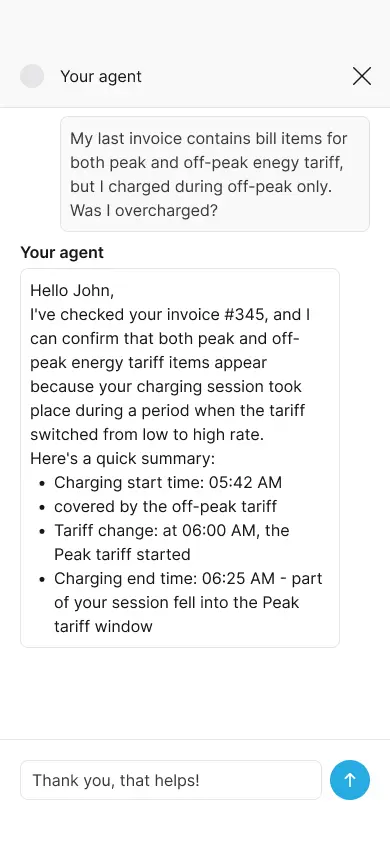
How to Use the AI Assistant
When you run into a problem, open the AI Assistant. It will show you a few common topics to help you quickly identify your issue. Just tap the option that best describes your situation.
You can use the AI Assistant to:
- Report an issue with a past charging session
- Get help when you’re unable to start charging
- Ask questions about charging prices
- Get support for anything else
- Open support ticket to your provider
What the AI Assistant Can Help You With
The assistant is here to support you, the driver. Here are some of the things it can help you with:
Charging Your Vehicle
- Report a problem: If a charger isn’t working or you had an issue with a session, you can report it directly through the assistant. Our team will then investigate the issue.
- Find a charger: Quickly locate available charging stations near you.
- Check compatibility: Get information on whether a charger is compatible with your vehicle.
Payments and Billing
- Dispute a charge: If you think there’s an error on your bill, you can dispute the charge.
- Understand pricing: Get clear information about charging costs and fees.
- Payment issues: Troubleshoot problems with your credit card or other payment methods.
Your Account
- Manage your plan: View or change your subscription plan.
- Update your details: Keep your account information up to date.
- Login help: Reset your password or get help if you’re having trouble signing in.
If there’s a wider network issue or a problem with a specific charger, the AI Assistant will provide you with the most current information and suggest alternative stations if possible.


