Account
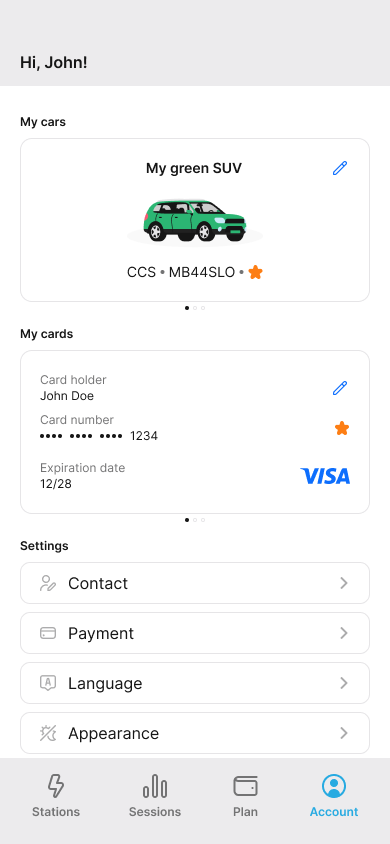
Welcome to your account section! Here you can manage all your personal settings and preferences for the EV Charge app.
What you can do in this section:
- Manage Your Contact Information
- Update Your Payment Methods
- Change the App Language
- Review Terms and Privacy Policy
- Get Help with FAQs & Manuals
- Contact Support
- Log Out or Delete Your Account
Manage Your Contact Information
Keeping your contact information up-to-date is important. This section shows the details you provided when you signed up.
You can see your:
- First and last name
- Email address
- Phone number
- Address
Need to make a change? Just click the Edit icon (). You can also add multiple contact addresses by clicking the Add icon () and giving each one a helpful tag (like “Home” or “Work”). Your primary contact will be tagged as “primary” by default.
Update Your Payment Methods
This is where you manage how you pay for charging. You can see the payment information linked to your account, including your name and address.
Adding a Credit Card
To add a new credit card:
- Go to the Payment section.
- Click the Edit icon ().
- Select “Credit Card” as your payment method and click Save.
- Click Add credit card and enter your card details in the secure form.
- Click Save.
We don’t store your full credit card details. We only keep a secure token and the last four digits of your card number for reference. You can add multiple cards, but one will always be set as your Primary card for payments.
Change the App Language
You can use the EV Charge app in your preferred language.
To change it:
- Go to the Language section.
- Click Set language ().
- Choose your language from the list.
Review Terms and Privacy Policy
We believe in being transparent. You can review our terms of service and privacy policy at any time. This will take you to a web page with the full details.
Get Help with FAQs & Manuals
Have questions? We’ve got answers! Check out our frequently asked questions and user manuals to get the most out of the EV Charge app.
Contact Support
If you need to get in touch with us, the “Contact us” section will take you to our support page where you can find the best way to reach us.
Log Out or Delete Your Account
Log Out
To log out of the app, simply click the Logout button.
Delete Your Account
If you want to permanently delete your account, you can do so by clicking the Delete account button. Please be aware that this action is irreversible and will remove all your data from our system.


